Chat and Assistant
Start conversations, attach files, use tools with approvals, manage long sessions, export work, and use the dedicated or floating assistant.
Find one workflow
Filter this collection by name, outcome, provider, engine, channel, mode, or command.
Start a clean conversation
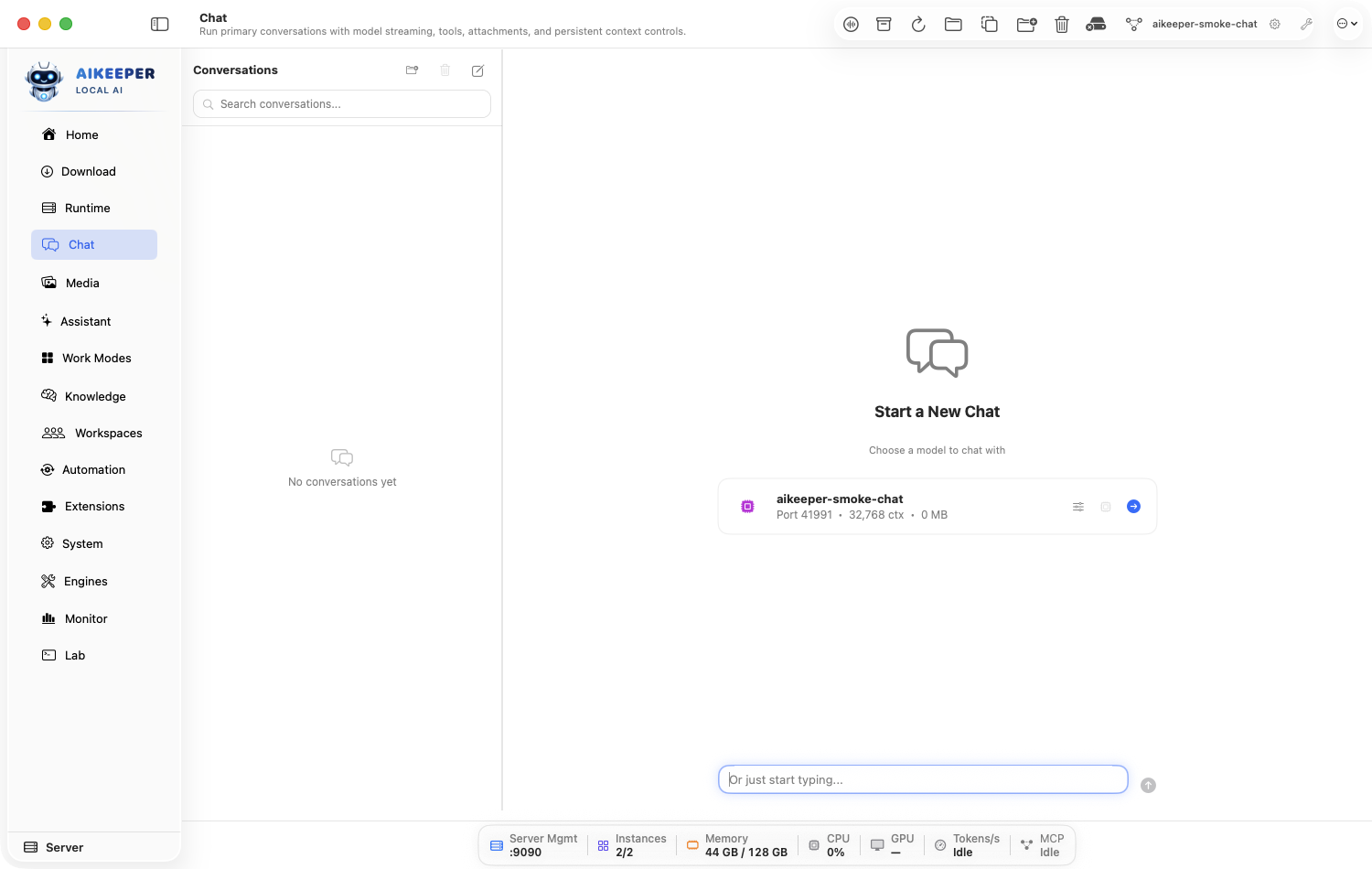
Pick a Ready model, send a clear request, and keep the conversation easy to find.
Before you start
- At least one Ready Chat/LLM instance or configured provider.
Open Chat and click the new-conversation control.
Choose the model by its model-scoped label. Prefer a smaller fast model for simple tasks and a stronger model for complex reasoning.
Write the goal, useful context, desired output, and any constraints in one message. Then send.
Rename or place the conversation in a sidebar folder if you expect to return to it.
You are done when
Text arrives progressively, the model label remains the one you chose, and the conversation appears in the sidebar.Ask about a file or image
Attach temporary material to one conversation without adding it to permanent knowledge.
Before you start
- A readable local file.
- For images, a vision-capable model or route.
Open Chat and use the attachment control to select the file or image.
Wait until the attachment is visibly listed in the composer. Remove any accidental file before sending.
Ask a specific question such as Summarize this PDF in five bullets and cite the page for each bullet.
For an image, confirm the selected model supports vision. For repeated future use, index the source under Knowledge instead of attaching it every time.
You are done when
The answer discusses details that are present in the attachment, and any tool/attachment status finishes without error.Let Chat use tools safely
Enable only the tools needed for the task and review sensitive calls before they run.
Before you start
- A model or external route with tool-calling enabled.
- At least one relevant built-in or MCP tool.
In Chat, open the tools control or type
/toolsto inspect what is available.Enable the smallest relevant set. Do not grant shell, browser, file-write, or messaging tools for a question that only needs date/time.
Ask for an action that clearly needs one enabled tool.
When an approval card appears, read the tool name and arguments. Approve only the exact intended action; otherwise reject and explain the safer alternative.
Wait for the assistant's follow-up after the tool result. A raw tool result alone is not the finished answer.
You are done when
The transcript contains assistant tool call, tool result, and a final assistant response; Settings > Audit Trail records the action.Use slash commands
Discover and run built-in session, context, tool, agent, approval, and export actions from the composer.
Before you start
- A Chat conversation is open.
Type
/in the composer and pause. Choose from the suggestion menu rather than guessing a command name.Use
/commandsfor the current full list,/statusfor runtime state,/contextfor context use, and/toolsfor tools.Use commands such as
/compact,/export,/reset, or/stoponly after reading their description in the suggestion row.Confirm the report or action shown in the transcript.
You are done when
The command is recognized as an action/report rather than sent as ordinary prompt text.Keep a long conversation going
Check context use and compact older messages before the model runs out of room.
Before you start
- A conversation with useful earlier context.
Type
/contextor inspect the context indicator to see how full the model window is.Before it reaches the limit, type
/compact. Let the summarization finish.Read the resulting summary. Correct any critical fact that was compressed incorrectly.
Continue with a short recap of the immediate next goal. If the topic has completely changed, start a new conversation instead.
You are done when
Context use drops, a compacted summary is present, and the next response still respects the important goals and constraints.Regenerate, fork, export, import, or archive a session
Preserve useful work and branch experiments without damaging the original conversation.
Before you start
- An existing conversation.
Use Regenerate when you want a different answer to the same last prompt.
Use the fork action when you want to explore a different direction while preserving the original history.
Use
/exportor the session export control to save a portable record. Choose the offered format and destination.Use the import action for a supported Ai Keeper session file; inspect it before continuing tool-enabled work.
Open Activity > Sessions to archive, restore, or audit older sessions.
You are done when
The original remains intact, the fork or regenerated branch is distinct, or the exported file opens and contains the expected transcript.Use the dedicated or floating Assistant
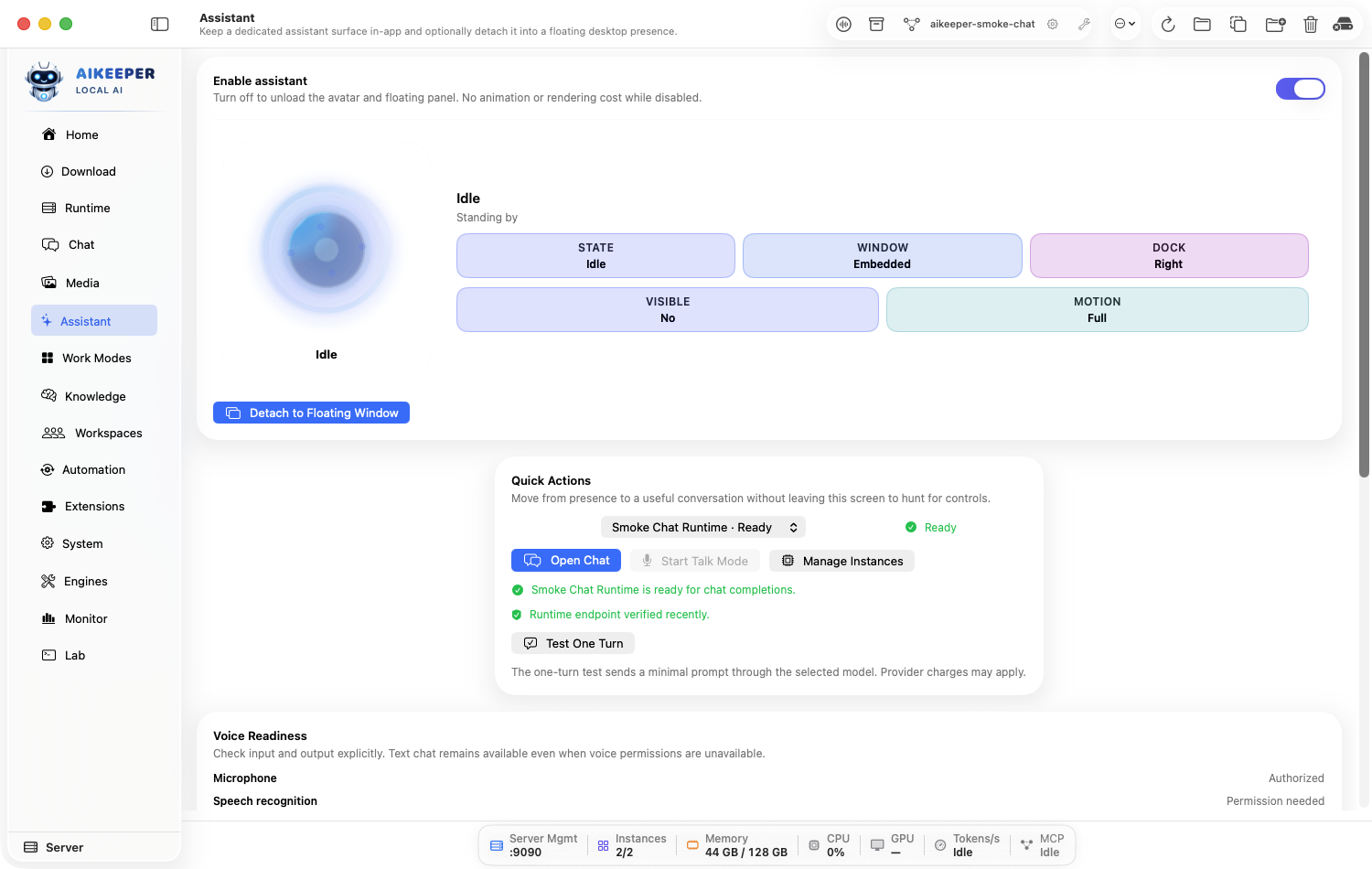
Keep quick help available without mixing it into an audited multi-agent workspace.
Before you start
- A Ready conversational model or provider route.
Open Chat, then choose Assistant from the chat tools and select the model/profile it should use.
Send a short request and confirm the dedicated surface answers.
Use the detach or floating-window control when you want the assistant to remain above other work.
Return to the main Chat conversation for carefully managed sessions or Agents for structured multi-agent runs.
You are done when
The Assistant responds, and detaching creates a usable floating presence without closing the main app.Choose Ask, Plan, or Agent for coding
Match coding authority to the task, review a plan before implementation, and keep read-only work read-only.
Before you start
- A project workspace selected in Chat.
- A conversational model capable of coding and tool use.
Start a project conversation and choose Ask for explanation or inspection that must not modify files.
Choose Plan, or type
/plan, when implementation should wait for an explicit plan review. Terminal commands remain read-only in Ask and Plan.Read the plan in Tasks. Choose Revise when scope or checks are missing; choose Approve and Implement only when the proposed mutations match your goal.
Use Agent for approved edits and commands. Open Review Permissions… before granting broader workspace or network authority.
Inspect the changed files and verification evidence before accepting the turn as complete.
You are done when
Ask and Plan do not write to the workspace; an approved Plan transitions into implementation; Agent changes remain visible in the review surface.Verify, review, apply, and undo a coding candidate
Stage agent edits in a private candidate, compare the diff, verify it, and apply only reviewed changes.
Before you start
- A trusted project workspace.
- Agent mode with private candidate staging enabled.
Enable Stage coding changes in a private workspace before asking Agent mode to modify the project.
After the turn, open Review and choose Inspect Diff. Check every changed path and explicitly decide whether reviewed deletions should be included.
Run Quick Verify or Full Verify; use Independent Review for higher-risk changes. Any edit after verification makes that evidence stale.
Choose Apply, confirm the exact candidate, and let source-drift protection reject the operation if the real workspace changed underneath it.
Use Undo Turn to restore the recorded checkpoints when the applied turn is wrong; use Redo Turn only while the redo record remains current.
You are done when
The applied source matches the reviewed candidate, verification is current, and Undo/Redo restores both workspace and chat state without partial changes.Use /summarize
Summarize the conversation so far. Learn the safe first invocation and the evidence that confirms it worked.
Before you start
- A Chat conversation with a Ready model/provider route.
- No important unsaved generation should be in progress.
- Type /commands when you need the live syntax shown by the installed app.
Open Chat, type
/summarize, and inspect the autocomplete description before pressing Return.Use the smallest safe example:
/summarize. Replace placeholders only with disposable test values.Read the command report in the transcript and compare it with the current Chat, model, session, or system state.
If the command returns usage text, follow that live syntax instead of guessing. The installed app is authoritative.
You are done when
/summarize returns a visible report, state change, export/import result, or controlled action matching “Summarize the conversation so far”; errors are reported in the transcript rather than silently ignored.Use /translate
Translate text to another language. Learn the safe first invocation and the evidence that confirms it worked.
Before you start
- A Chat conversation with a Ready model/provider route.
- No important unsaved generation should be in progress.
- Type /commands when you need the live syntax shown by the installed app.
Open Chat, type
/translate, and inspect the autocomplete description before pressing Return.Use the smallest safe example:
/translate to German: Hello, how are you?. Replace placeholders only with disposable test values.Read the command report in the transcript and compare it with the current Chat, model, session, or system state.
If the command returns usage text, follow that live syntax instead of guessing. The installed app is authoritative.
You are done when
/translate returns a visible report, state change, export/import result, or controlled action matching “Translate text to another language”; errors are reported in the transcript rather than silently ignored.Use /code
Ask for code generation. Learn the safe first invocation and the evidence that confirms it worked.
Before you start
- A Chat conversation with a Ready model/provider route.
- No important unsaved generation should be in progress.
- Type /commands when you need the live syntax shown by the installed app.
Open Chat, type
/code, and inspect the autocomplete description before pressing Return.Use the smallest safe example:
/code Write a Swift function that adds two integers.. Replace placeholders only with disposable test values.Read the command report in the transcript and compare it with the current Chat, model, session, or system state.
If the command returns usage text, follow that live syntax instead of guessing. The installed app is authoritative.
You are done when
/code returns a visible report, state change, export/import result, or controlled action matching “Ask for code generation”; errors are reported in the transcript rather than silently ignored.Use /explain
Explain a concept or code. Learn the safe first invocation and the evidence that confirms it worked.
Before you start
- A Chat conversation with a Ready model/provider route.
- No important unsaved generation should be in progress.
- Type /commands when you need the live syntax shown by the installed app.
Open Chat, type
/explain, and inspect the autocomplete description before pressing Return.Use the smallest safe example:
/explain What is retrieval-augmented generation?. Replace placeholders only with disposable test values.Read the command report in the transcript and compare it with the current Chat, model, session, or system state.
If the command returns usage text, follow that live syntax instead of guessing. The installed app is authoritative.
You are done when
/explain returns a visible report, state change, export/import result, or controlled action matching “Explain a concept or code”; errors are reported in the transcript rather than silently ignored.Use /fix
Fix bugs in code. Learn the safe first invocation and the evidence that confirms it worked.
Before you start
- A Chat conversation with a Ready model/provider route.
- No important unsaved generation should be in progress.
- Type /commands when you need the live syntax shown by the installed app.
Open Chat, type
/fix, and inspect the autocomplete description before pressing Return.Use the smallest safe example:
/fix Explain the bug in this pasted snippet before changing it.. Replace placeholders only with disposable test values.Read the command report in the transcript and compare it with the current Chat, model, session, or system state.
If the command returns usage text, follow that live syntax instead of guessing. The installed app is authoritative.
You are done when
/fix returns a visible report, state change, export/import result, or controlled action matching “Fix bugs in code”; errors are reported in the transcript rather than silently ignored.Use /review
Review code for improvements. Learn the safe first invocation and the evidence that confirms it worked.
Before you start
- A Chat conversation with a Ready model/provider route.
- No important unsaved generation should be in progress.
- Type /commands when you need the live syntax shown by the installed app.
Open Chat, type
/review, and inspect the autocomplete description before pressing Return.Use the smallest safe example:
/review Review this pasted function for correctness.. Replace placeholders only with disposable test values.Read the command report in the transcript and compare it with the current Chat, model, session, or system state.
If the command returns usage text, follow that live syntax instead of guessing. The installed app is authoritative.
You are done when
/review returns a visible report, state change, export/import result, or controlled action matching “Review code for improvements”; errors are reported in the transcript rather than silently ignored.Use /brainstorm
Brainstorm ideas. Learn the safe first invocation and the evidence that confirms it worked.
Before you start
- A Chat conversation with a Ready model/provider route.
- No important unsaved generation should be in progress.
- Type /commands when you need the live syntax shown by the installed app.
Open Chat, type
/brainstorm, and inspect the autocomplete description before pressing Return.Use the smallest safe example:
/brainstorm Five names for a local AI project.. Replace placeholders only with disposable test values.Read the command report in the transcript and compare it with the current Chat, model, session, or system state.
If the command returns usage text, follow that live syntax instead of guessing. The installed app is authoritative.
You are done when
/brainstorm returns a visible report, state change, export/import result, or controlled action matching “Brainstorm ideas”; errors are reported in the transcript rather than silently ignored.Use /proscons
List pros and cons. Learn the safe first invocation and the evidence that confirms it worked.
Before you start
- A Chat conversation with a Ready model/provider route.
- No important unsaved generation should be in progress.
- Type /commands when you need the live syntax shown by the installed app.
Open Chat, type
/proscons, and inspect the autocomplete description before pressing Return.Use the smallest safe example:
/proscons Local model versus cloud model.. Replace placeholders only with disposable test values.Read the command report in the transcript and compare it with the current Chat, model, session, or system state.
If the command returns usage text, follow that live syntax instead of guessing. The installed app is authoritative.
You are done when
/proscons returns a visible report, state change, export/import result, or controlled action matching “List pros and cons”; errors are reported in the transcript rather than silently ignored.Use /memory
Show what the assistant remembers about you. Learn the safe first invocation and the evidence that confirms it worked.
Before you start
- A Chat conversation with a Ready model/provider route.
- No important unsaved generation should be in progress.
- Type /commands when you need the live syntax shown by the installed app.
Open Chat, type
/memory, and inspect the autocomplete description before pressing Return.Use the smallest safe example:
/memory. Replace placeholders only with disposable test values.Read the command report in the transcript and compare it with the current Chat, model, session, or system state.
If the command returns usage text, follow that live syntax instead of guessing. The installed app is authoritative.
You are done when
/memory returns a visible report, state change, export/import result, or controlled action matching “Show what the assistant remembers about you”; errors are reported in the transcript rather than silently ignored.Use /clear
Start a new conversation. Learn the safe first invocation and the evidence that confirms it worked.
Before you start
- A Chat conversation with a Ready model/provider route.
- Use a disposable conversation, path, task, or destination for the first test.
- Type /commands when you need the live syntax shown by the installed app.
Open a disposable Chat and type
/clearonly when you are ready to read its usage/confirmation without applying an important change.Use the smallest safe example:
/clear. Replace placeholders only with disposable test values.Read the preview, target, or approval prompt. Cancel if the target is broader than intended; otherwise confirm once and inspect the result.
If the command returns usage text, follow that live syntax instead of guessing. The installed app is authoritative.
You are done when
/clear returns a visible report, state change, export/import result, or controlled action matching “Start a new conversation”; errors are reported in the transcript rather than silently ignored.Use /regenerate
Regenerate the last response. Learn the safe first invocation and the evidence that confirms it worked.
Before you start
- A Chat conversation with a Ready model/provider route.
- No important unsaved generation should be in progress.
- Type /commands when you need the live syntax shown by the installed app.
Open Chat, type
/regenerate, and inspect the autocomplete description before pressing Return.Use the smallest safe example:
/regenerate. Replace placeholders only with disposable test values.Read the command report in the transcript and compare it with the current Chat, model, session, or system state.
If the command returns usage text, follow that live syntax instead of guessing. The installed app is authoritative.
You are done when
/regenerate returns a visible report, state change, export/import result, or controlled action matching “Regenerate the last response”; errors are reported in the transcript rather than silently ignored.Use /agent
Toggle agent mode for multi-step tasks. Learn the safe first invocation and the evidence that confirms it worked.
Before you start
- A Chat conversation with a Ready model/provider route.
- No important unsaved generation should be in progress.
- Type /commands when you need the live syntax shown by the installed app.
Open Chat, type
/agent, and inspect the autocomplete description before pressing Return.Use the smallest safe example:
/agent. Replace placeholders only with disposable test values.Read the command report in the transcript and compare it with the current Chat, model, session, or system state.
If the command returns usage text, follow that live syntax instead of guessing. The installed app is authoritative.
You are done when
/agent returns a visible report, state change, export/import result, or controlled action matching “Toggle agent mode for multi-step tasks”; errors are reported in the transcript rather than silently ignored.Use /plan
Enable plan mode; use /plan off to disable. Learn the safe first invocation and the evidence that confirms it worked.
Before you start
- A Chat conversation with a Ready model/provider route.
- No important unsaved generation should be in progress.
- Type /commands when you need the live syntax shown by the installed app.
Open Chat, type
/plan, and inspect the autocomplete description before pressing Return.Use the smallest safe example:
/plan. Replace placeholders only with disposable test values.Read the command report in the transcript and compare it with the current Chat, model, session, or system state.
If the command returns usage text, follow that live syntax instead of guessing. The installed app is authoritative.
You are done when
/plan returns a visible report, state change, export/import result, or controlled action matching “Enable plan mode; use /plan off to disable”; errors are reported in the transcript rather than silently ignored.Use /compact
Summarize and trim the conversation. Learn the safe first invocation and the evidence that confirms it worked.
Before you start
- A Chat conversation with a Ready model/provider route.
- No important unsaved generation should be in progress.
- Type /commands when you need the live syntax shown by the installed app.
Open Chat, type
/compact, and inspect the autocomplete description before pressing Return.Use the smallest safe example:
/compact. Replace placeholders only with disposable test values.Read the command report in the transcript and compare it with the current Chat, model, session, or system state.
If the command returns usage text, follow that live syntax instead of guessing. The installed app is authoritative.
You are done when
/compact returns a visible report, state change, export/import result, or controlled action matching “Summarize and trim the conversation”; errors are reported in the transcript rather than silently ignored.Use /status
Show active model, tasks, and system status. Learn the safe first invocation and the evidence that confirms it worked.
Before you start
- A Chat conversation with a Ready model/provider route.
- No important unsaved generation should be in progress.
- Type /commands when you need the live syntax shown by the installed app.
Open Chat, type
/status, and inspect the autocomplete description before pressing Return.Use the smallest safe example:
/status. Replace placeholders only with disposable test values.Read the command report in the transcript and compare it with the current Chat, model, session, or system state.
If the command returns usage text, follow that live syntax instead of guessing. The installed app is authoritative.
You are done when
/status returns a visible report, state change, export/import result, or controlled action matching “Show active model, tasks, and system status”; errors are reported in the transcript rather than silently ignored.Use /context
Show effective prompt and active policies for current agent. Learn the safe first invocation and the evidence that confirms it worked.
Before you start
- A Chat conversation with a Ready model/provider route.
- No important unsaved generation should be in progress.
- Type /commands when you need the live syntax shown by the installed app.
Open Chat, type
/context, and inspect the autocomplete description before pressing Return.Use the smallest safe example:
/context. Replace placeholders only with disposable test values.Read the command report in the transcript and compare it with the current Chat, model, session, or system state.
If the command returns usage text, follow that live syntax instead of guessing. The installed app is authoritative.
You are done when
/context returns a visible report, state change, export/import result, or controlled action matching “Show effective prompt and active policies for current agent”; errors are reported in the transcript rather than silently ignored.Use /plugins
Show installed ClawHub packages. Learn the safe first invocation and the evidence that confirms it worked.
Before you start
- A Chat conversation with a Ready model/provider route.
- No important unsaved generation should be in progress.
- Type /commands when you need the live syntax shown by the installed app.
Open Chat, type
/plugins, and inspect the autocomplete description before pressing Return.Use the smallest safe example:
/plugins. Replace placeholders only with disposable test values.Read the command report in the transcript and compare it with the current Chat, model, session, or system state.
If the command returns usage text, follow that live syntax instead of guessing. The installed app is authoritative.
You are done when
/plugins returns a visible report, state change, export/import result, or controlled action matching “Show installed ClawHub packages”; errors are reported in the transcript rather than silently ignored.Use /mcp
Show connected MCP servers. Learn the safe first invocation and the evidence that confirms it worked.
Before you start
- A Chat conversation with a Ready model/provider route.
- No important unsaved generation should be in progress.
- Type /commands when you need the live syntax shown by the installed app.
Open Chat, type
/mcp, and inspect the autocomplete description before pressing Return.Use the smallest safe example:
/mcp. Replace placeholders only with disposable test values.Read the command report in the transcript and compare it with the current Chat, model, session, or system state.
If the command returns usage text, follow that live syntax instead of guessing. The installed app is authoritative.
You are done when
/mcp returns a visible report, state change, export/import result, or controlled action matching “Show connected MCP servers”; errors are reported in the transcript rather than silently ignored.Use /models
Show available and running models. Learn the safe first invocation and the evidence that confirms it worked.
Before you start
- A Chat conversation with a Ready model/provider route.
- No important unsaved generation should be in progress.
- Type /commands when you need the live syntax shown by the installed app.
Open Chat, type
/models, and inspect the autocomplete description before pressing Return.Use the smallest safe example:
/models. Replace placeholders only with disposable test values.Read the command report in the transcript and compare it with the current Chat, model, session, or system state.
If the command returns usage text, follow that live syntax instead of guessing. The installed app is authoritative.
You are done when
/models returns a visible report, state change, export/import result, or controlled action matching “Show available and running models”; errors are reported in the transcript rather than silently ignored.Use /tasks
Show scheduled tasks. Learn the safe first invocation and the evidence that confirms it worked.
Before you start
- A Chat conversation with a Ready model/provider route.
- No important unsaved generation should be in progress.
- Type /commands when you need the live syntax shown by the installed app.
Open Chat, type
/tasks, and inspect the autocomplete description before pressing Return.Use the smallest safe example:
/tasks. Replace placeholders only with disposable test values.Read the command report in the transcript and compare it with the current Chat, model, session, or system state.
If the command returns usage text, follow that live syntax instead of guessing. The installed app is authoritative.
You are done when
/tasks returns a visible report, state change, export/import result, or controlled action matching “Show scheduled tasks”; errors are reported in the transcript rather than silently ignored.Use /hooks
Show active hooks. Learn the safe first invocation and the evidence that confirms it worked.
Before you start
- A Chat conversation with a Ready model/provider route.
- No important unsaved generation should be in progress.
- Type /commands when you need the live syntax shown by the installed app.
Open Chat, type
/hooks, and inspect the autocomplete description before pressing Return.Use the smallest safe example:
/hooks. Replace placeholders only with disposable test values.Read the command report in the transcript and compare it with the current Chat, model, session, or system state.
If the command returns usage text, follow that live syntax instead of guessing. The installed app is authoritative.
You are done when
/hooks returns a visible report, state change, export/import result, or controlled action matching “Show active hooks”; errors are reported in the transcript rather than silently ignored.Use /orders
Show standing orders. Learn the safe first invocation and the evidence that confirms it worked.
Before you start
- A Chat conversation with a Ready model/provider route.
- No important unsaved generation should be in progress.
- Type /commands when you need the live syntax shown by the installed app.
Open Chat, type
/orders, and inspect the autocomplete description before pressing Return.Use the smallest safe example:
/orders. Replace placeholders only with disposable test values.Read the command report in the transcript and compare it with the current Chat, model, session, or system state.
If the command returns usage text, follow that live syntax instead of guessing. The installed app is authoritative.
You are done when
/orders returns a visible report, state change, export/import result, or controlled action matching “Show standing orders”; errors are reported in the transcript rather than silently ignored.Use /find
Search Skills + MCP registries for a term. Learn the safe first invocation and the evidence that confirms it worked.
Before you start
- A Chat conversation with a Ready model/provider route.
- No important unsaved generation should be in progress.
- Type /commands when you need the live syntax shown by the installed app.
Open Chat, type
/find, and inspect the autocomplete description before pressing Return.Use the smallest safe example:
/find calendar. Replace placeholders only with disposable test values.Read the command report in the transcript and compare it with the current Chat, model, session, or system state.
If the command returns usage text, follow that live syntax instead of guessing. The installed app is authoritative.
You are done when
/find returns a visible report, state change, export/import result, or controlled action matching “Search Skills + MCP registries for a term”; errors are reported in the transcript rather than silently ignored.Use /snapshot
Snapshot a directory before risky tool runs. Learn the safe first invocation and the evidence that confirms it worked.
Before you start
- A Chat conversation with a Ready model/provider route.
- Use a disposable conversation, path, task, or destination for the first test.
- Type /commands when you need the live syntax shown by the installed app.
Open a disposable Chat and type
/snapshotonly when you are ready to read its usage/confirmation without applying an important change.Use the smallest safe example:
/snapshot /path/to/project -- before update. Replace placeholders only with disposable test values.Read the preview, target, or approval prompt. Cancel if the target is broader than intended; otherwise confirm once and inspect the result.
If the command returns usage text, follow that live syntax instead of guessing. The installed app is authoritative.
You are done when
/snapshot returns a visible report, state change, export/import result, or controlled action matching “Snapshot a directory before risky tool runs”; errors are reported in the transcript rather than silently ignored.Use /rollback
Restore the most recent snapshot. Learn the safe first invocation and the evidence that confirms it worked.
Before you start
- A Chat conversation with a Ready model/provider route.
- Use a disposable conversation, path, task, or destination for the first test.
- Type /commands when you need the live syntax shown by the installed app.
Open a disposable Chat and type
/rollbackonly when you are ready to read its usage/confirmation without applying an important change.Use the smallest safe example:
/rollback <snapshot-id>. Replace placeholders only with disposable test values.Read the preview, target, or approval prompt. Cancel if the target is broader than intended; otherwise confirm once and inspect the result.
If the command returns usage text, follow that live syntax instead of guessing. The installed app is authoritative.
You are done when
/rollback returns a visible report, state change, export/import result, or controlled action matching “Restore the most recent snapshot”; errors are reported in the transcript rather than silently ignored.Use /recommend
Surface capability gaps in the active toolset. Learn the safe first invocation and the evidence that confirms it worked.
Before you start
- A Chat conversation with a Ready model/provider route.
- No important unsaved generation should be in progress.
- Type /commands when you need the live syntax shown by the installed app.
Open Chat, type
/recommend, and inspect the autocomplete description before pressing Return.Use the smallest safe example:
/recommend. Replace placeholders only with disposable test values.Read the command report in the transcript and compare it with the current Chat, model, session, or system state.
If the command returns usage text, follow that live syntax instead of guessing. The installed app is authoritative.
You are done when
/recommend returns a visible report, state change, export/import result, or controlled action matching “Surface capability gaps in the active toolset”; errors are reported in the transcript rather than silently ignored.Use /commitments
List inferred follow-up commitments. Learn the safe first invocation and the evidence that confirms it worked.
Before you start
- A Chat conversation with a Ready model/provider route.
- No important unsaved generation should be in progress.
- Type /commands when you need the live syntax shown by the installed app.
Open Chat, type
/commitments, and inspect the autocomplete description before pressing Return.Use the smallest safe example:
/commitments. Replace placeholders only with disposable test values.Read the command report in the transcript and compare it with the current Chat, model, session, or system state.
If the command returns usage text, follow that live syntax instead of guessing. The installed app is authoritative.
You are done when
/commitments returns a visible report, state change, export/import result, or controlled action matching “List inferred follow-up commitments”; errors are reported in the transcript rather than silently ignored.Use /commit
Add a follow-up commitment manually. Learn the safe first invocation and the evidence that confirms it worked.
Before you start
- A Chat conversation with a Ready model/provider route.
- Use a disposable conversation, path, task, or destination for the first test.
- Type /commands when you need the live syntax shown by the installed app.
Open a disposable Chat and type
/commitonly when you are ready to read its usage/confirmation without applying an important change.Use the smallest safe example:
/commit 2h review the authentication notes. Replace placeholders only with disposable test values.Read the preview, target, or approval prompt. Cancel if the target is broader than intended; otherwise confirm once and inspect the result.
If the command returns usage text, follow that live syntax instead of guessing. The installed app is authoritative.
You are done when
/commit returns a visible report, state change, export/import result, or controlled action matching “Add a follow-up commitment manually”; errors are reported in the transcript rather than silently ignored.Use /ingest
Index a local file or folder for document_search. Learn the safe first invocation and the evidence that confirms it worked.
Before you start
- A Chat conversation with a Ready model/provider route.
- Use a disposable conversation, path, task, or destination for the first test.
- Type /commands when you need the live syntax shown by the installed app.
Open a disposable Chat and type
/ingestonly when you are ready to read its usage/confirmation without applying an important change.Use the smallest safe example:
/ingest /path/to/document.pdf. Replace placeholders only with disposable test values.Read the preview, target, or approval prompt. Cancel if the target is broader than intended; otherwise confirm once and inspect the result.
If the command returns usage text, follow that live syntax instead of guessing. The installed app is authoritative.
You are done when
/ingest returns a visible report, state change, export/import result, or controlled action matching “Index a local file or folder for document_search”; errors are reported in the transcript rather than silently ignored.Use /ingested
List ingested documents. Learn the safe first invocation and the evidence that confirms it worked.
Before you start
- A Chat conversation with a Ready model/provider route.
- No important unsaved generation should be in progress.
- Type /commands when you need the live syntax shown by the installed app.
Open Chat, type
/ingested, and inspect the autocomplete description before pressing Return.Use the smallest safe example:
/ingested. Replace placeholders only with disposable test values.Read the command report in the transcript and compare it with the current Chat, model, session, or system state.
If the command returns usage text, follow that live syntax instead of guessing. The installed app is authoritative.
You are done when
/ingested returns a visible report, state change, export/import result, or controlled action matching “List ingested documents”; errors are reported in the transcript rather than silently ignored.Use /forget
Drop ingested documents matching a pattern. Learn the safe first invocation and the evidence that confirms it worked.
Before you start
- A Chat conversation with a Ready model/provider route.
- Use a disposable conversation, path, task, or destination for the first test.
- Type /commands when you need the live syntax shown by the installed app.
Open a disposable Chat and type
/forgetonly when you are ready to read its usage/confirmation without applying an important change.Use the smallest safe example:
/forget document.pdf. Replace placeholders only with disposable test values.Read the preview, target, or approval prompt. Cancel if the target is broader than intended; otherwise confirm once and inspect the result.
If the command returns usage text, follow that live syntax instead of guessing. The installed app is authoritative.
You are done when
/forget returns a visible report, state change, export/import result, or controlled action matching “Drop ingested documents matching a pattern”; errors are reported in the transcript rather than silently ignored.Use /watch
Watch a folder and auto-reingest files on change. Learn the safe first invocation and the evidence that confirms it worked.
Before you start
- A Chat conversation with a Ready model/provider route.
- Use a disposable conversation, path, task, or destination for the first test.
- Type /commands when you need the live syntax shown by the installed app.
Open a disposable Chat and type
/watchonly when you are ready to read its usage/confirmation without applying an important change.Use the smallest safe example:
/watch /path/to/notes. Replace placeholders only with disposable test values.Read the preview, target, or approval prompt. Cancel if the target is broader than intended; otherwise confirm once and inspect the result.
If the command returns usage text, follow that live syntax instead of guessing. The installed app is authoritative.
You are done when
/watch returns a visible report, state change, export/import result, or controlled action matching “Watch a folder and auto-reingest files on change”; errors are reported in the transcript rather than silently ignored.Use /unwatch
Stop watching a folder. Learn the safe first invocation and the evidence that confirms it worked.
Before you start
- A Chat conversation with a Ready model/provider route.
- Use a disposable conversation, path, task, or destination for the first test.
- Type /commands when you need the live syntax shown by the installed app.
Open a disposable Chat and type
/unwatchonly when you are ready to read its usage/confirmation without applying an important change.Use the smallest safe example:
/unwatch /path/to/notes. Replace placeholders only with disposable test values.Read the preview, target, or approval prompt. Cancel if the target is broader than intended; otherwise confirm once and inspect the result.
If the command returns usage text, follow that live syntax instead of guessing. The installed app is authoritative.
You are done when
/unwatch returns a visible report, state change, export/import result, or controlled action matching “Stop watching a folder”; errors are reported in the transcript rather than silently ignored.Use /preset
Save, apply, list, or delete per-chat config presets. Learn the safe first invocation and the evidence that confirms it worked.
Before you start
- A Chat conversation with a Ready model/provider route.
- Use a disposable conversation, path, task, or destination for the first test.
- Type /commands when you need the live syntax shown by the installed app.
Open a disposable Chat and type
/presetonly when you are ready to read its usage/confirmation without applying an important change.Use the smallest safe example:
/preset list. Replace placeholders only with disposable test values.Read the preview, target, or approval prompt. Cancel if the target is broader than intended; otherwise confirm once and inspect the result.
If the command returns usage text, follow that live syntax instead of guessing. The installed app is authoritative.
You are done when
/preset returns a visible report, state change, export/import result, or controlled action matching “Save, apply, list, or delete per-chat config presets”; errors are reported in the transcript rather than silently ignored.Use /verbose
Ask for a detailed response. Learn the safe first invocation and the evidence that confirms it worked.
Before you start
- A Chat conversation with a Ready model/provider route.
- No important unsaved generation should be in progress.
- Type /commands when you need the live syntax shown by the installed app.
Open Chat, type
/verbose, and inspect the autocomplete description before pressing Return.Use the smallest safe example:
/verbose. Replace placeholders only with disposable test values.Read the command report in the transcript and compare it with the current Chat, model, session, or system state.
If the command returns usage text, follow that live syntax instead of guessing. The installed app is authoritative.
You are done when
/verbose returns a visible report, state change, export/import result, or controlled action matching “Ask for a detailed response”; errors are reported in the transcript rather than silently ignored.Use /reasoning
Show step-by-step reasoning. Learn the safe first invocation and the evidence that confirms it worked.
Before you start
- A Chat conversation with a Ready model/provider route.
- No important unsaved generation should be in progress.
- Type /commands when you need the live syntax shown by the installed app.
Open Chat, type
/reasoning, and inspect the autocomplete description before pressing Return.Use the smallest safe example:
/reasoning. Replace placeholders only with disposable test values.Read the command report in the transcript and compare it with the current Chat, model, session, or system state.
If the command returns usage text, follow that live syntax instead of guessing. The installed app is authoritative.
You are done when
/reasoning returns a visible report, state change, export/import result, or controlled action matching “Show step-by-step reasoning”; errors are reported in the transcript rather than silently ignored.Use /exec
Configure exec policy or run an allowed shell command. Learn the safe first invocation and the evidence that confirms it worked.
Before you start
- A Chat conversation with a Ready model/provider route.
- Use a disposable conversation, path, task, or destination for the first test.
- Type /commands when you need the live syntax shown by the installed app.
Open a disposable Chat and type
/execonly when you are ready to read its usage/confirmation without applying an important change.Use the smallest safe example:
/exec status. Replace placeholders only with disposable test values.Read the preview, target, or approval prompt. Cancel if the target is broader than intended; otherwise confirm once and inspect the result.
If the command returns usage text, follow that live syntax instead of guessing. The installed app is authoritative.
You are done when
/exec returns a visible report, state change, export/import result, or controlled action matching “Configure exec policy or run an allowed shell command”; errors are reported in the transcript rather than silently ignored.Use /new
Start a new conversation. Learn the safe first invocation and the evidence that confirms it worked.
Before you start
- A Chat conversation with a Ready model/provider route.
- Use a disposable conversation, path, task, or destination for the first test.
- Type /commands when you need the live syntax shown by the installed app.
Open a disposable Chat and type
/newonly when you are ready to read its usage/confirmation without applying an important change.Use the smallest safe example:
/new. Replace placeholders only with disposable test values.Read the preview, target, or approval prompt. Cancel if the target is broader than intended; otherwise confirm once and inspect the result.
If the command returns usage text, follow that live syntax instead of guessing. The installed app is authoritative.
You are done when
/new returns a visible report, state change, export/import result, or controlled action matching “Start a new conversation”; errors are reported in the transcript rather than silently ignored.Use /reset
Reset agent session context. Learn the safe first invocation and the evidence that confirms it worked.
Before you start
- A Chat conversation with a Ready model/provider route.
- Use a disposable conversation, path, task, or destination for the first test.
- Type /commands when you need the live syntax shown by the installed app.
Open a disposable Chat and type
/resetonly when you are ready to read its usage/confirmation without applying an important change.Use the smallest safe example:
/reset. Replace placeholders only with disposable test values.Read the preview, target, or approval prompt. Cancel if the target is broader than intended; otherwise confirm once and inspect the result.
If the command returns usage text, follow that live syntax instead of guessing. The installed app is authoritative.
You are done when
/reset returns a visible report, state change, export/import result, or controlled action matching “Reset agent session context”; errors are reported in the transcript rather than silently ignored.Use /stop
Stop current generation. Learn the safe first invocation and the evidence that confirms it worked.
Before you start
- A Chat conversation with a Ready model/provider route.
- No important unsaved generation should be in progress.
- Type /commands when you need the live syntax shown by the installed app.
Open Chat, type
/stop, and inspect the autocomplete description before pressing Return.Use the smallest safe example:
/stop. Replace placeholders only with disposable test values.Read the command report in the transcript and compare it with the current Chat, model, session, or system state.
If the command returns usage text, follow that live syntax instead of guessing. The installed app is authoritative.
You are done when
/stop returns a visible report, state change, export/import result, or controlled action matching “Stop current generation”; errors are reported in the transcript rather than silently ignored.Use /session
Show or edit current session and thread bindings. Learn the safe first invocation and the evidence that confirms it worked.
Before you start
- A Chat conversation with a Ready model/provider route.
- No important unsaved generation should be in progress.
- Type /commands when you need the live syntax shown by the installed app.
Open Chat, type
/session, and inspect the autocomplete description before pressing Return.Use the smallest safe example:
/session. Replace placeholders only with disposable test values.Read the command report in the transcript and compare it with the current Chat, model, session, or system state.
If the command returns usage text, follow that live syntax instead of guessing. The installed app is authoritative.
You are done when
/session returns a visible report, state change, export/import result, or controlled action matching “Show or edit current session and thread bindings”; errors are reported in the transcript rather than silently ignored.Use /tools
Show available tools for the current agent. Learn the safe first invocation and the evidence that confirms it worked.
Before you start
- A Chat conversation with a Ready model/provider route.
- No important unsaved generation should be in progress.
- Type /commands when you need the live syntax shown by the installed app.
Open Chat, type
/tools, and inspect the autocomplete description before pressing Return.Use the smallest safe example:
/tools. Replace placeholders only with disposable test values.Read the command report in the transcript and compare it with the current Chat, model, session, or system state.
If the command returns usage text, follow that live syntax instead of guessing. The installed app is authoritative.
You are done when
/tools returns a visible report, state change, export/import result, or controlled action matching “Show available tools for the current agent”; errors are reported in the transcript rather than silently ignored.Use /commands
Show all available slash commands. Learn the safe first invocation and the evidence that confirms it worked.
Before you start
- A Chat conversation with a Ready model/provider route.
- No important unsaved generation should be in progress.
- Type /commands when you need the live syntax shown by the installed app.
Open Chat, type
/commands, and inspect the autocomplete description before pressing Return.Use the smallest safe example:
/commands. Replace placeholders only with disposable test values.Read the command report in the transcript and compare it with the current Chat, model, session, or system state.
If the command returns usage text, follow that live syntax instead of guessing. The installed app is authoritative.
You are done when
/commands returns a visible report, state change, export/import result, or controlled action matching “Show all available slash commands”; errors are reported in the transcript rather than silently ignored.Use /agents
Show configured agents and active agent sessions. Learn the safe first invocation and the evidence that confirms it worked.
Before you start
- A Chat conversation with a Ready model/provider route.
- No important unsaved generation should be in progress.
- Type /commands when you need the live syntax shown by the installed app.
Open Chat, type
/agents, and inspect the autocomplete description before pressing Return.Use the smallest safe example:
/agents. Replace placeholders only with disposable test values.Read the command report in the transcript and compare it with the current Chat, model, session, or system state.
If the command returns usage text, follow that live syntax instead of guessing. The installed app is authoritative.
You are done when
/agents returns a visible report, state change, export/import result, or controlled action matching “Show configured agents and active agent sessions”; errors are reported in the transcript rather than silently ignored.Use /think
Toggle step-by-step reasoning mode. Learn the safe first invocation and the evidence that confirms it worked.
Before you start
- A Chat conversation with a Ready model/provider route.
- No important unsaved generation should be in progress.
- Type /commands when you need the live syntax shown by the installed app.
Open Chat, type
/think, and inspect the autocomplete description before pressing Return.Use the smallest safe example:
/think. Replace placeholders only with disposable test values.Read the command report in the transcript and compare it with the current Chat, model, session, or system state.
If the command returns usage text, follow that live syntax instead of guessing. The installed app is authoritative.
You are done when
/think returns a visible report, state change, export/import result, or controlled action matching “Toggle step-by-step reasoning mode”; errors are reported in the transcript rather than silently ignored.Use /fast
Use concise, fast response mode. Learn the safe first invocation and the evidence that confirms it worked.
Before you start
- A Chat conversation with a Ready model/provider route.
- No important unsaved generation should be in progress.
- Type /commands when you need the live syntax shown by the installed app.
Open Chat, type
/fast, and inspect the autocomplete description before pressing Return.Use the smallest safe example:
/fast. Replace placeholders only with disposable test values.Read the command report in the transcript and compare it with the current Chat, model, session, or system state.
If the command returns usage text, follow that live syntax instead of guessing. The installed app is authoritative.
You are done when
/fast returns a visible report, state change, export/import result, or controlled action matching “Use concise, fast response mode”; errors are reported in the transcript rather than silently ignored.Use /elevated
Use expert-level detailed mode. Learn the safe first invocation and the evidence that confirms it worked.
Before you start
- A Chat conversation with a Ready model/provider route.
- No important unsaved generation should be in progress.
- Type /commands when you need the live syntax shown by the installed app.
Open Chat, type
/elevated, and inspect the autocomplete description before pressing Return.Use the smallest safe example:
/elevated. Replace placeholders only with disposable test values.Read the command report in the transcript and compare it with the current Chat, model, session, or system state.
If the command returns usage text, follow that live syntax instead of guessing. The installed app is authoritative.
You are done when
/elevated returns a visible report, state change, export/import result, or controlled action matching “Use expert-level detailed mode”; errors are reported in the transcript rather than silently ignored.Use /focus
Suppress unrelated work and focus on a task. Learn the safe first invocation and the evidence that confirms it worked.
Before you start
- A Chat conversation with a Ready model/provider route.
- No important unsaved generation should be in progress.
- Type /commands when you need the live syntax shown by the installed app.
Open Chat, type
/focus, and inspect the autocomplete description before pressing Return.Use the smallest safe example:
/focus. Replace placeholders only with disposable test values.Read the command report in the transcript and compare it with the current Chat, model, session, or system state.
If the command returns usage text, follow that live syntax instead of guessing. The installed app is authoritative.
You are done when
/focus returns a visible report, state change, export/import result, or controlled action matching “Suppress unrelated work and focus on a task”; errors are reported in the transcript rather than silently ignored.Use /unfocus
Exit focus mode. Learn the safe first invocation and the evidence that confirms it worked.
Before you start
- A Chat conversation with a Ready model/provider route.
- No important unsaved generation should be in progress.
- Type /commands when you need the live syntax shown by the installed app.
Open Chat, type
/unfocus, and inspect the autocomplete description before pressing Return.Use the smallest safe example:
/unfocus. Replace placeholders only with disposable test values.Read the command report in the transcript and compare it with the current Chat, model, session, or system state.
If the command returns usage text, follow that live syntax instead of guessing. The installed app is authoritative.
You are done when
/unfocus returns a visible report, state change, export/import result, or controlled action matching “Exit focus mode”; errors are reported in the transcript rather than silently ignored.Use /queue
Switch queue mode or queue a background task. Learn the safe first invocation and the evidence that confirms it worked.
Before you start
- A Chat conversation with a Ready model/provider route.
- Use a disposable conversation, path, task, or destination for the first test.
- Type /commands when you need the live syntax shown by the installed app.
Open a disposable Chat and type
/queueonly when you are ready to read its usage/confirmation without applying an important change.Use the smallest safe example:
/queue status. Replace placeholders only with disposable test values.Read the preview, target, or approval prompt. Cancel if the target is broader than intended; otherwise confirm once and inspect the result.
If the command returns usage text, follow that live syntax instead of guessing. The installed app is authoritative.
You are done when
/queue returns a visible report, state change, export/import result, or controlled action matching “Switch queue mode or queue a background task”; errors are reported in the transcript rather than silently ignored.Use /side
Ask a side question without interrupting the main task. Learn the safe first invocation and the evidence that confirms it worked.
Before you start
- A Chat conversation with a Ready model/provider route.
- No important unsaved generation should be in progress.
- Type /commands when you need the live syntax shown by the installed app.
Open Chat, type
/side, and inspect the autocomplete description before pressing Return.Use the smallest safe example:
/side What does this term mean?. Replace placeholders only with disposable test values.Read the command report in the transcript and compare it with the current Chat, model, session, or system state.
If the command returns usage text, follow that live syntax instead of guessing. The installed app is authoritative.
You are done when
/side returns a visible report, state change, export/import result, or controlled action matching “Ask a side question without interrupting the main task”; errors are reported in the transcript rather than silently ignored.Use /btw
Alias for /side. Learn the safe first invocation and the evidence that confirms it worked.
Before you start
- A Chat conversation with a Ready model/provider route.
- No important unsaved generation should be in progress.
- Type /commands when you need the live syntax shown by the installed app.
Open Chat, type
/btw, and inspect the autocomplete description before pressing Return.Use the smallest safe example:
/btw What does this term mean?. Replace placeholders only with disposable test values.Read the command report in the transcript and compare it with the current Chat, model, session, or system state.
If the command returns usage text, follow that live syntax instead of guessing. The installed app is authoritative.
You are done when
/btw returns a visible report, state change, export/import result, or controlled action matching “Alias for /side”; errors are reported in the transcript rather than silently ignored.Use /id
Alias for /whoami. Learn the safe first invocation and the evidence that confirms it worked.
Before you start
- A Chat conversation with a Ready model/provider route.
- No important unsaved generation should be in progress.
- Type /commands when you need the live syntax shown by the installed app.
Open Chat, type
/id, and inspect the autocomplete description before pressing Return.Use the smallest safe example:
/id. Replace placeholders only with disposable test values.Read the command report in the transcript and compare it with the current Chat, model, session, or system state.
If the command returns usage text, follow that live syntax instead of guessing. The installed app is authoritative.
You are done when
/id returns a visible report, state change, export/import result, or controlled action matching “Alias for /whoami”; errors are reported in the transcript rather than silently ignored.Use /whoami
Show current identity, channel, and session information. Learn the safe first invocation and the evidence that confirms it worked.
Before you start
- A Chat conversation with a Ready model/provider route.
- No important unsaved generation should be in progress.
- Type /commands when you need the live syntax shown by the installed app.
Open Chat, type
/whoami, and inspect the autocomplete description before pressing Return.Use the smallest safe example:
/whoami. Replace placeholders only with disposable test values.Read the command report in the transcript and compare it with the current Chat, model, session, or system state.
If the command returns usage text, follow that live syntax instead of guessing. The installed app is authoritative.
You are done when
/whoami returns a visible report, state change, export/import result, or controlled action matching “Show current identity, channel, and session information”; errors are reported in the transcript rather than silently ignored.Use /allowlist
Show or edit DM and channel allowlists. Learn the safe first invocation and the evidence that confirms it worked.
Before you start
- A Chat conversation with a Ready model/provider route.
- No important unsaved generation should be in progress.
- Type /commands when you need the live syntax shown by the installed app.
Open Chat, type
/allowlist, and inspect the autocomplete description before pressing Return.Use the smallest safe example:
/allowlist. Replace placeholders only with disposable test values.Read the command report in the transcript and compare it with the current Chat, model, session, or system state.
If the command returns usage text, follow that live syntax instead of guessing. The installed app is authoritative.
You are done when
/allowlist returns a visible report, state change, export/import result, or controlled action matching “Show or edit DM and channel allowlists”; errors are reported in the transcript rather than silently ignored.Use /usage
Show current runtime usage and limits. Learn the safe first invocation and the evidence that confirms it worked.
Before you start
- A Chat conversation with a Ready model/provider route.
- No important unsaved generation should be in progress.
- Type /commands when you need the live syntax shown by the installed app.
Open Chat, type
/usage, and inspect the autocomplete description before pressing Return.Use the smallest safe example:
/usage. Replace placeholders only with disposable test values.Read the command report in the transcript and compare it with the current Chat, model, session, or system state.
If the command returns usage text, follow that live syntax instead of guessing. The installed app is authoritative.
You are done when
/usage returns a visible report, state change, export/import result, or controlled action matching “Show current runtime usage and limits”; errors are reported in the transcript rather than silently ignored.Use /activation
Show or edit channel activation policy. Learn the safe first invocation and the evidence that confirms it worked.
Before you start
- A Chat conversation with a Ready model/provider route.
- No important unsaved generation should be in progress.
- Type /commands when you need the live syntax shown by the installed app.
Open Chat, type
/activation, and inspect the autocomplete description before pressing Return.Use the smallest safe example:
/activation. Replace placeholders only with disposable test values.Read the command report in the transcript and compare it with the current Chat, model, session, or system state.
If the command returns usage text, follow that live syntax instead of guessing. The installed app is authoritative.
You are done when
/activation returns a visible report, state change, export/import result, or controlled action matching “Show or edit channel activation policy”; errors are reported in the transcript rather than silently ignored.Use /send
Send a message to a channel target. Learn the safe first invocation and the evidence that confirms it worked.
Before you start
- A Chat conversation with a Ready model/provider route.
- Use a disposable conversation, path, task, or destination for the first test.
- Type /commands when you need the live syntax shown by the installed app.
Open a disposable Chat and type
/sendonly when you are ready to read its usage/confirmation without applying an important change.Use the smallest safe example:
/send <test-target> Ai Keeper connection test. Replace placeholders only with disposable test values.Read the preview, target, or approval prompt. Cancel if the target is broader than intended; otherwise confirm once and inspect the result.
If the command returns usage text, follow that live syntax instead of guessing. The installed app is authoritative.
You are done when
/send returns a visible report, state change, export/import result, or controlled action matching “Send a message to a channel target”; errors are reported in the transcript rather than silently ignored.Use /restart
Restart the active runtime or connector. Learn the safe first invocation and the evidence that confirms it worked.
Before you start
- A Chat conversation with a Ready model/provider route.
- Use a disposable conversation, path, task, or destination for the first test.
- Type /commands when you need the live syntax shown by the installed app.
Open a disposable Chat and type
/restartonly when you are ready to read its usage/confirmation without applying an important change.Use the smallest safe example:
/restart status. Replace placeholders only with disposable test values.Read the preview, target, or approval prompt. Cancel if the target is broader than intended; otherwise confirm once and inspect the result.
If the command returns usage text, follow that live syntax instead of guessing. The installed app is authoritative.
You are done when
/restart returns a visible report, state change, export/import result, or controlled action matching “Restart the active runtime or connector”; errors are reported in the transcript rather than silently ignored.Use /vc
Show or manage voice-channel status. Learn the safe first invocation and the evidence that confirms it worked.
Before you start
- A Chat conversation with a Ready model/provider route.
- No important unsaved generation should be in progress.
- Type /commands when you need the live syntax shown by the installed app.
Open Chat, type
/vc, and inspect the autocomplete description before pressing Return.Use the smallest safe example:
/vc status. Replace placeholders only with disposable test values.Read the command report in the transcript and compare it with the current Chat, model, session, or system state.
If the command returns usage text, follow that live syntax instead of guessing. The installed app is authoritative.
You are done when
/vc returns a visible report, state change, export/import result, or controlled action matching “Show or manage voice-channel status”; errors are reported in the transcript rather than silently ignored.Use /approve
Approve or deny pending exec or tool approvals. Learn the safe first invocation and the evidence that confirms it worked.
Before you start
- A Chat conversation with a Ready model/provider route.
- Use a disposable conversation, path, task, or destination for the first test.
- Type /commands when you need the live syntax shown by the installed app.
Open a disposable Chat and type
/approveonly when you are ready to read its usage/confirmation without applying an important change.Use the smallest safe example:
/approve list. Replace placeholders only with disposable test values.Read the preview, target, or approval prompt. Cancel if the target is broader than intended; otherwise confirm once and inspect the result.
If the command returns usage text, follow that live syntax instead of guessing. The installed app is authoritative.
You are done when
/approve returns a visible report, state change, export/import result, or controlled action matching “Approve or deny pending exec or tool approvals”; errors are reported in the transcript rather than silently ignored.Use /subagents
List, spawn, or manage sub-agents. Learn the safe first invocation and the evidence that confirms it worked.
Before you start
- A Chat conversation with a Ready model/provider route.
- Use a disposable conversation, path, task, or destination for the first test.
- Type /commands when you need the live syntax shown by the installed app.
Open a disposable Chat and type
/subagentsonly when you are ready to read its usage/confirmation without applying an important change.Use the smallest safe example:
/subagents list. Replace placeholders only with disposable test values.Read the preview, target, or approval prompt. Cancel if the target is broader than intended; otherwise confirm once and inspect the result.
If the command returns usage text, follow that live syntax instead of guessing. The installed app is authoritative.
You are done when
/subagents returns a visible report, state change, export/import result, or controlled action matching “List, spawn, or manage sub-agents”; errors are reported in the transcript rather than silently ignored.Use /kill
Terminate a running agent session or background task. Learn the safe first invocation and the evidence that confirms it worked.
Before you start
- A Chat conversation with a Ready model/provider route.
- Use a disposable conversation, path, task, or destination for the first test.
- Type /commands when you need the live syntax shown by the installed app.
Open a disposable Chat and type
/killonly when you are ready to read its usage/confirmation without applying an important change.Use the smallest safe example:
/kill <test-task-id>. Replace placeholders only with disposable test values.Read the preview, target, or approval prompt. Cancel if the target is broader than intended; otherwise confirm once and inspect the result.
If the command returns usage text, follow that live syntax instead of guessing. The installed app is authoritative.
You are done when
/kill returns a visible report, state change, export/import result, or controlled action matching “Terminate a running agent session or background task”; errors are reported in the transcript rather than silently ignored.Use /steer
Redirect conversation to a different agent or mode. Learn the safe first invocation and the evidence that confirms it worked.
Before you start
- A Chat conversation with a Ready model/provider route.
- Use a disposable conversation, path, task, or destination for the first test.
- Type /commands when you need the live syntax shown by the installed app.
Open a disposable Chat and type
/steeronly when you are ready to read its usage/confirmation without applying an important change.Use the smallest safe example:
/steer <agent-name>. Replace placeholders only with disposable test values.Read the preview, target, or approval prompt. Cancel if the target is broader than intended; otherwise confirm once and inspect the result.
If the command returns usage text, follow that live syntax instead of guessing. The installed app is authoritative.
You are done when
/steer returns a visible report, state change, export/import result, or controlled action matching “Redirect conversation to a different agent or mode”; errors are reported in the transcript rather than silently ignored.Use /acp
Show or configure Agent Communication Protocol policies. Learn the safe first invocation and the evidence that confirms it worked.
Before you start
- A Chat conversation with a Ready model/provider route.
- No important unsaved generation should be in progress.
- Type /commands when you need the live syntax shown by the installed app.
Open Chat, type
/acp, and inspect the autocomplete description before pressing Return.Use the smallest safe example:
/acp status. Replace placeholders only with disposable test values.Read the command report in the transcript and compare it with the current Chat, model, session, or system state.
If the command returns usage text, follow that live syntax instead of guessing. The installed app is authoritative.
You are done when
/acp returns a visible report, state change, export/import result, or controlled action matching “Show or configure Agent Communication Protocol policies”; errors are reported in the transcript rather than silently ignored.Use /export-session
Export a session transcript as Markdown or JSON. Learn the safe first invocation and the evidence that confirms it worked.
Before you start
- A Chat conversation with a Ready model/provider route.
- No important unsaved generation should be in progress.
- Type /commands when you need the live syntax shown by the installed app.
Open Chat, type
/export-session, and inspect the autocomplete description before pressing Return.Use the smallest safe example:
/export-session markdown. Replace placeholders only with disposable test values.Read the command report in the transcript and compare it with the current Chat, model, session, or system state.
If the command returns usage text, follow that live syntax instead of guessing. The installed app is authoritative.
You are done when
/export-session returns a visible report, state change, export/import result, or controlled action matching “Export a session transcript as Markdown or JSON”; errors are reported in the transcript rather than silently ignored.Use /import-session
Import a conversation from an exported JSON file. Learn the safe first invocation and the evidence that confirms it worked.
Before you start
- A Chat conversation with a Ready model/provider route.
- Use a disposable conversation, path, task, or destination for the first test.
- Type /commands when you need the live syntax shown by the installed app.
Open a disposable Chat and type
/import-sessiononly when you are ready to read its usage/confirmation without applying an important change.Use the smallest safe example:
/import-session. Replace placeholders only with disposable test values.Read the preview, target, or approval prompt. Cancel if the target is broader than intended; otherwise confirm once and inspect the result.
If the command returns usage text, follow that live syntax instead of guessing. The installed app is authoritative.