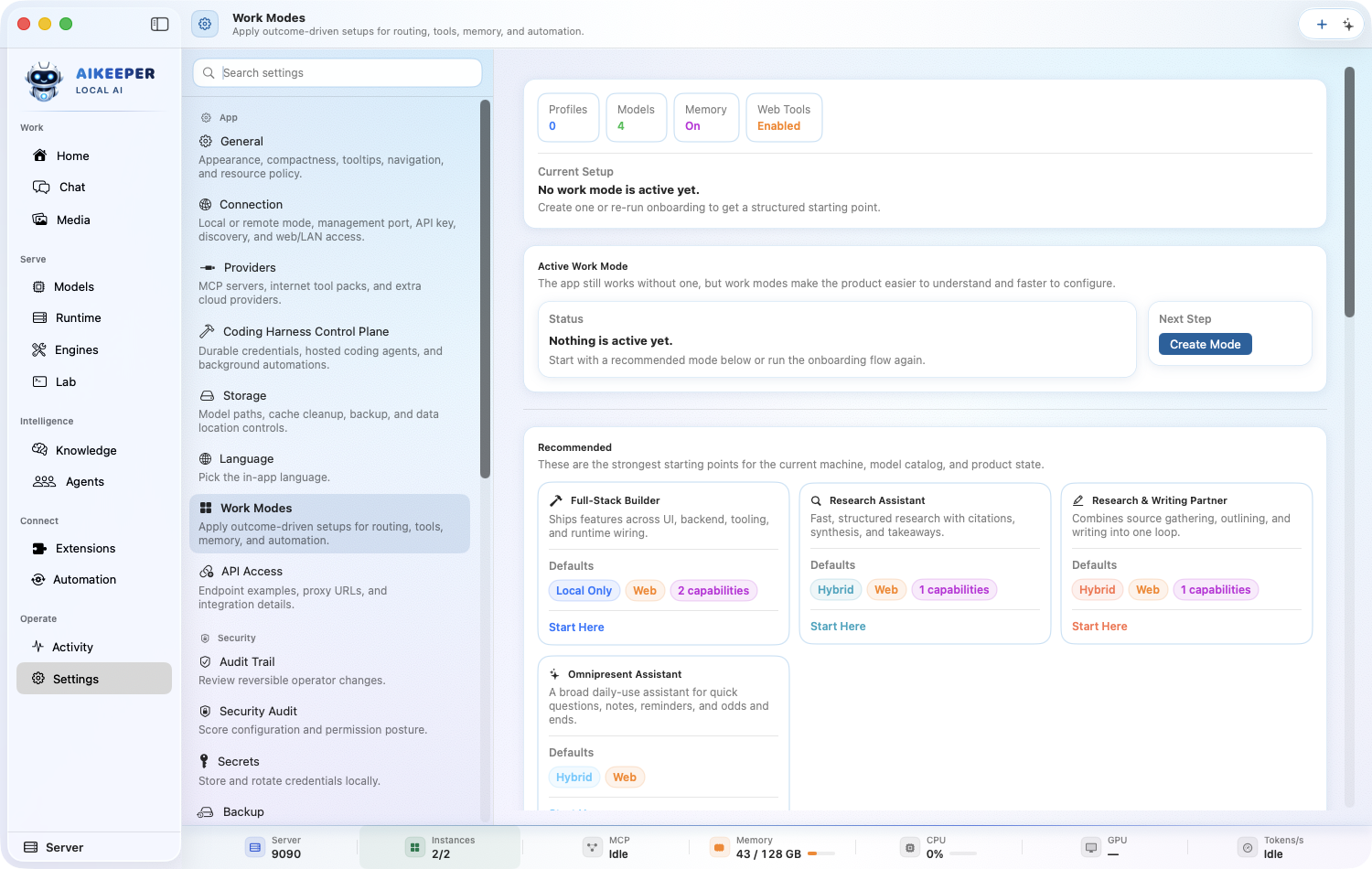
Every Work Mode
Choose the exact outcome you want, review what that preset changes, satisfy only its real requirements, and prove the starter behavior before using important data.
Find one workflow
Filter this collection by name, outcome, provider, engine, channel, mode, or command.
Use the Secure Coder Work Mode
Safer code changes, threat awareness, regression discipline, and minimal blast radius. This mode belongs to the Developer Copilot family.
Before you start
- At least one Ready model or provider route.
- Review any capability, package, MCP, secret, or permission requirement shown by the mode.
- Use disposable test content for the first run.
Open Settings > Work Modes, find the Developer Copilot family, and select Secure Coder.
Read the exact outcome before applying it: Safer code changes, threat awareness, regression discipline, and minimal blast radius.
Open Requirements. Resolve blocking items only, review recommended items, and leave unrelated optional packages uninstalled.
Click Start Here or Apply. Review the proposed execution mode, memory behavior, autonomy, tools, starter workspace, and automations before confirming.
Run this harmless starter prompt: Explain the safest first change and how you would verify it. Approve no mutation unless the preview matches your intent.
You are done when
Secure Coder is the active Work Mode, its health has no blocker, and the starter response matches the mode summary without an unexpected tool or external action.Use the Full-Stack Builder Work Mode
Ships features across UI, backend, tooling, and runtime wiring. This mode belongs to the Developer Copilot family.
Before you start
- At least one Ready model or provider route.
- Review any capability, package, MCP, secret, or permission requirement shown by the mode.
- Use disposable test content for the first run.
Open Settings > Work Modes, find the Developer Copilot family, and select Full-Stack Builder.
Read the exact outcome before applying it: Ships features across UI, backend, tooling, and runtime wiring.
Open Requirements. Resolve blocking items only, review recommended items, and leave unrelated optional packages uninstalled.
Click Start Here or Apply. Review the proposed execution mode, memory behavior, autonomy, tools, starter workspace, and automations before confirming.
Run this harmless starter prompt: Explain the safest first change and how you would verify it. Approve no mutation unless the preview matches your intent.
You are done when
Full-Stack Builder is the active Work Mode, its health has no blocker, and the starter response matches the mode summary without an unexpected tool or external action.Use the Code Explainer Work Mode
Explains architecture, files, bugs, and tradeoffs without over-editing. This mode belongs to the Developer Copilot family.
Before you start
- At least one Ready model or provider route.
- Review any capability, package, MCP, secret, or permission requirement shown by the mode.
- Use disposable test content for the first run.
Open Settings > Work Modes, find the Developer Copilot family, and select Code Explainer.
Read the exact outcome before applying it: Explains architecture, files, bugs, and tradeoffs without over-editing.
Open Requirements. Resolve blocking items only, review recommended items, and leave unrelated optional packages uninstalled.
Click Start Here or Apply. Review the proposed execution mode, memory behavior, autonomy, tools, starter workspace, and automations before confirming.
Run this harmless starter prompt: Explain the safest first change and how you would verify it. Approve no mutation unless the preview matches your intent.
You are done when
Code Explainer is the active Work Mode, its health has no blocker, and the starter response matches the mode summary without an unexpected tool or external action.Use the Terminal Assistant Work Mode
Helps with shell commands, local debugging, and CLI ergonomics. This mode belongs to the Developer Copilot family.
Before you start
- At least one Ready model or provider route.
- Review any capability, package, MCP, secret, or permission requirement shown by the mode.
- Use disposable test content for the first run.
Open Settings > Work Modes, find the Developer Copilot family, and select Terminal Assistant.
Read the exact outcome before applying it: Helps with shell commands, local debugging, and CLI ergonomics.
Open Requirements. Resolve blocking items only, review recommended items, and leave unrelated optional packages uninstalled.
Click Start Here or Apply. Review the proposed execution mode, memory behavior, autonomy, tools, starter workspace, and automations before confirming.
Run this harmless starter prompt: Explain the safest first change and how you would verify it. Approve no mutation unless the preview matches your intent.
You are done when
Terminal Assistant is the active Work Mode, its health has no blocker, and the starter response matches the mode summary without an unexpected tool or external action.Use the Git Commit Writer Work Mode
Turns diffs and context into clear commits, PR notes, and changelogs. This mode belongs to the Developer Copilot family.
Before you start
- At least one Ready model or provider route.
- Review any capability, package, MCP, secret, or permission requirement shown by the mode.
- Use disposable test content for the first run.
Open Settings > Work Modes, find the Developer Copilot family, and select Git Commit Writer.
Read the exact outcome before applying it: Turns diffs and context into clear commits, PR notes, and changelogs.
Open Requirements. Resolve blocking items only, review recommended items, and leave unrelated optional packages uninstalled.
Click Start Here or Apply. Review the proposed execution mode, memory behavior, autonomy, tools, starter workspace, and automations before confirming.
Run this harmless starter prompt: Explain the safest first change and how you would verify it. Approve no mutation unless the preview matches your intent.
You are done when
Git Commit Writer is the active Work Mode, its health has no blocker, and the starter response matches the mode summary without an unexpected tool or external action.Use the Refactoring Agent Work Mode
Untangles large code paths while preserving behavior and readability. This mode belongs to the Developer Copilot family.
Before you start
- At least one Ready model or provider route.
- Review any capability, package, MCP, secret, or permission requirement shown by the mode.
- Use disposable test content for the first run.
Open Settings > Work Modes, find the Developer Copilot family, and select Refactoring Agent.
Read the exact outcome before applying it: Untangles large code paths while preserving behavior and readability.
Open Requirements. Resolve blocking items only, review recommended items, and leave unrelated optional packages uninstalled.
Click Start Here or Apply. Review the proposed execution mode, memory behavior, autonomy, tools, starter workspace, and automations before confirming.
Run this harmless starter prompt: Explain the safest first change and how you would verify it. Approve no mutation unless the preview matches your intent.
You are done when
Refactoring Agent is the active Work Mode, its health has no blocker, and the starter response matches the mode summary without an unexpected tool or external action.Use the Test Generator Work Mode
Adds regression tests, fixtures, and coverage-oriented checks. This mode belongs to the Developer Copilot family.
Before you start
- At least one Ready model or provider route.
- Review any capability, package, MCP, secret, or permission requirement shown by the mode.
- Use disposable test content for the first run.
Open Settings > Work Modes, find the Developer Copilot family, and select Test Generator.
Read the exact outcome before applying it: Adds regression tests, fixtures, and coverage-oriented checks.
Open Requirements. Resolve blocking items only, review recommended items, and leave unrelated optional packages uninstalled.
Click Start Here or Apply. Review the proposed execution mode, memory behavior, autonomy, tools, starter workspace, and automations before confirming.
Run this harmless starter prompt: Explain the safest first change and how you would verify it. Approve no mutation unless the preview matches your intent.
You are done when
Test Generator is the active Work Mode, its health has no blocker, and the starter response matches the mode summary without an unexpected tool or external action.Use the Migration Assistant Work Mode
Plans and executes framework, API, schema, and tooling migrations. This mode belongs to the Developer Copilot family.
Before you start
- At least one Ready model or provider route.
- Review any capability, package, MCP, secret, or permission requirement shown by the mode.
- Use disposable test content for the first run.
Open Settings > Work Modes, find the Developer Copilot family, and select Migration Assistant.
Read the exact outcome before applying it: Plans and executes framework, API, schema, and tooling migrations.
Open Requirements. Resolve blocking items only, review recommended items, and leave unrelated optional packages uninstalled.
Click Start Here or Apply. Review the proposed execution mode, memory behavior, autonomy, tools, starter workspace, and automations before confirming.
Run this harmless starter prompt: Explain the safest first change and how you would verify it. Approve no mutation unless the preview matches your intent.
You are done when
Migration Assistant is the active Work Mode, its health has no blocker, and the starter response matches the mode summary without an unexpected tool or external action.Use the Research Assistant Work Mode
Fast, structured research with citations, synthesis, and takeaways. This mode belongs to the Research & Knowledge family.
Before you start
- At least one Ready model or provider route.
- Review any capability, package, MCP, secret, or permission requirement shown by the mode.
- Use disposable test content for the first run.
Open Settings > Work Modes, find the Research & Knowledge family, and select Research Assistant.
Read the exact outcome before applying it: Fast, structured research with citations, synthesis, and takeaways.
Open Requirements. Resolve blocking items only, review recommended items, and leave unrelated optional packages uninstalled.
Click Start Here or Apply. Review the proposed execution mode, memory behavior, autonomy, tools, starter workspace, and automations before confirming.
Run this harmless starter prompt: Create a source-backed outline and mark uncertainty. Approve no mutation unless the preview matches your intent.
You are done when
Research Assistant is the active Work Mode, its health has no blocker, and the starter response matches the mode summary without an unexpected tool or external action.Use the Deep Researcher Work Mode
Long-form investigation across multiple sources, comparisons, and source trails. This mode belongs to the Research & Knowledge family.
Before you start
- At least one Ready model or provider route.
- Review any capability, package, MCP, secret, or permission requirement shown by the mode.
- Use disposable test content for the first run.
Open Settings > Work Modes, find the Research & Knowledge family, and select Deep Researcher.
Read the exact outcome before applying it: Long-form investigation across multiple sources, comparisons, and source trails.
Open Requirements. Resolve blocking items only, review recommended items, and leave unrelated optional packages uninstalled.
Click Start Here or Apply. Review the proposed execution mode, memory behavior, autonomy, tools, starter workspace, and automations before confirming.
Run this harmless starter prompt: Create a source-backed outline and mark uncertainty. Approve no mutation unless the preview matches your intent.
You are done when
Deep Researcher is the active Work Mode, its health has no blocker, and the starter response matches the mode summary without an unexpected tool or external action.Use the Knowledge Base Chat Work Mode
Uses local memory and any documents you have indexed as a reusable answer surface. This mode belongs to the Research & Knowledge family.
Before you start
- At least one Ready model or provider route.
- Review any capability, package, MCP, secret, or permission requirement shown by the mode.
- Use disposable test content for the first run.
Open Settings > Work Modes, find the Research & Knowledge family, and select Knowledge Base Chat.
Read the exact outcome before applying it: Uses local memory and any documents you have indexed as a reusable answer surface.
Open Requirements. Resolve blocking items only, review recommended items, and leave unrelated optional packages uninstalled.
Click Start Here or Apply. Review the proposed execution mode, memory behavior, autonomy, tools, starter workspace, and automations before confirming.
Run this harmless starter prompt: Create a source-backed outline and mark uncertainty. Approve no mutation unless the preview matches your intent.
You are done when
Knowledge Base Chat is the active Work Mode, its health has no blocker, and the starter response matches the mode summary without an unexpected tool or external action.Use the Paper Analyzer Work Mode
Understands research papers, methods, claims, and limitations. This mode belongs to the Research & Knowledge family.
Before you start
- At least one Ready model or provider route.
- Review any capability, package, MCP, secret, or permission requirement shown by the mode.
- Use disposable test content for the first run.
Open Settings > Work Modes, find the Research & Knowledge family, and select Paper Analyzer.
Read the exact outcome before applying it: Understands research papers, methods, claims, and limitations.
Open Requirements. Resolve blocking items only, review recommended items, and leave unrelated optional packages uninstalled.
Click Start Here or Apply. Review the proposed execution mode, memory behavior, autonomy, tools, starter workspace, and automations before confirming.
Run this harmless starter prompt: Create a source-backed outline and mark uncertainty. Approve no mutation unless the preview matches your intent.
You are done when
Paper Analyzer is the active Work Mode, its health has no blocker, and the starter response matches the mode summary without an unexpected tool or external action.Use the Legal Document Analyst Work Mode
Summarizes clauses, obligations, risks, and missing context in legal text. This mode belongs to the Research & Knowledge family.
Before you start
- At least one Ready model or provider route.
- Review any capability, package, MCP, secret, or permission requirement shown by the mode.
- Use disposable test content for the first run.
Open Settings > Work Modes, find the Research & Knowledge family, and select Legal Document Analyst.
Read the exact outcome before applying it: Summarizes clauses, obligations, risks, and missing context in legal text.
Open Requirements. Resolve blocking items only, review recommended items, and leave unrelated optional packages uninstalled.
Click Start Here or Apply. Review the proposed execution mode, memory behavior, autonomy, tools, starter workspace, and automations before confirming.
Run this harmless starter prompt: Create a source-backed outline and mark uncertainty. Approve no mutation unless the preview matches your intent.
You are done when
Legal Document Analyst is the active Work Mode, its health has no blocker, and the starter response matches the mode summary without an unexpected tool or external action.Use the Meeting Transcript Processor Work Mode
Turns transcripts into summaries, actions, owners, and knowledge notes. This mode belongs to the Research & Knowledge family.
Before you start
- At least one Ready model or provider route.
- Review any capability, package, MCP, secret, or permission requirement shown by the mode.
- Use disposable test content for the first run.
Open Settings > Work Modes, find the Research & Knowledge family, and select Meeting Transcript Processor.
Read the exact outcome before applying it: Turns transcripts into summaries, actions, owners, and knowledge notes.
Open Requirements. Resolve blocking items only, review recommended items, and leave unrelated optional packages uninstalled.
Click Start Here or Apply. Review the proposed execution mode, memory behavior, autonomy, tools, starter workspace, and automations before confirming.
Run this harmless starter prompt: Create a source-backed outline and mark uncertainty. Approve no mutation unless the preview matches your intent.
You are done when
Meeting Transcript Processor is the active Work Mode, its health has no blocker, and the starter response matches the mode summary without an unexpected tool or external action.Use the Book / Report Summarizer Work Mode
Compresses long documents into useful notes, frameworks, and action points. This mode belongs to the Research & Knowledge family.
Before you start
- At least one Ready model or provider route.
- Review any capability, package, MCP, secret, or permission requirement shown by the mode.
- Use disposable test content for the first run.
Open Settings > Work Modes, find the Research & Knowledge family, and select Book / Report Summarizer.
Read the exact outcome before applying it: Compresses long documents into useful notes, frameworks, and action points.
Open Requirements. Resolve blocking items only, review recommended items, and leave unrelated optional packages uninstalled.
Click Start Here or Apply. Review the proposed execution mode, memory behavior, autonomy, tools, starter workspace, and automations before confirming.
Run this harmless starter prompt: Create a source-backed outline and mark uncertainty. Approve no mutation unless the preview matches your intent.
You are done when
Book / Report Summarizer is the active Work Mode, its health has no blocker, and the starter response matches the mode summary without an unexpected tool or external action.Use the Local Knowledge Vault Work Mode
Persistent local memory plus RAG-style retrieval for trusted on-device context. This mode belongs to the Research & Knowledge family.
Before you start
- At least one Ready model or provider route.
- Review any capability, package, MCP, secret, or permission requirement shown by the mode.
- Use disposable test content for the first run.
Open Settings > Work Modes, find the Research & Knowledge family, and select Local Knowledge Vault.
Read the exact outcome before applying it: Persistent local memory plus RAG-style retrieval for trusted on-device context.
Open Requirements. Resolve blocking items only, review recommended items, and leave unrelated optional packages uninstalled.
Click Start Here or Apply. Review the proposed execution mode, memory behavior, autonomy, tools, starter workspace, and automations before confirming.
Run this harmless starter prompt: Create a source-backed outline and mark uncertainty. Approve no mutation unless the preview matches your intent.
You are done when
Local Knowledge Vault is the active Work Mode, its health has no blocker, and the starter response matches the mode summary without an unexpected tool or external action.Use the Editor / Proofreader Work Mode
Polishes clarity, grammar, structure, and tone without flattening the voice. This mode belongs to the Writer & Content family.
Before you start
- At least one Ready model or provider route.
- Review any capability, package, MCP, secret, or permission requirement shown by the mode.
- Use disposable test content for the first run.
Open Settings > Work Modes, find the Writer & Content family, and select Editor / Proofreader.
Read the exact outcome before applying it: Polishes clarity, grammar, structure, and tone without flattening the voice.
Open Requirements. Resolve blocking items only, review recommended items, and leave unrelated optional packages uninstalled.
Click Start Here or Apply. Review the proposed execution mode, memory behavior, autonomy, tools, starter workspace, and automations before confirming.
Run this harmless starter prompt: Improve this short draft while preserving its meaning. Approve no mutation unless the preview matches your intent.
You are done when
Editor / Proofreader is the active Work Mode, its health has no blocker, and the starter response matches the mode summary without an unexpected tool or external action.Use the Copywriter Work Mode
Creates persuasive product, landing page, and campaign copy. This mode belongs to the Writer & Content family.
Before you start
- At least one Ready model or provider route.
- Review any capability, package, MCP, secret, or permission requirement shown by the mode.
- Use disposable test content for the first run.
Open Settings > Work Modes, find the Writer & Content family, and select Copywriter.
Read the exact outcome before applying it: Creates persuasive product, landing page, and campaign copy.
Open Requirements. Resolve blocking items only, review recommended items, and leave unrelated optional packages uninstalled.
Click Start Here or Apply. Review the proposed execution mode, memory behavior, autonomy, tools, starter workspace, and automations before confirming.
Run this harmless starter prompt: Improve this short draft while preserving its meaning. Approve no mutation unless the preview matches your intent.
You are done when
Copywriter is the active Work Mode, its health has no blocker, and the starter response matches the mode summary without an unexpected tool or external action.Use the Technical Writer Work Mode
Turns product and code context into precise documentation. This mode belongs to the Writer & Content family.
Before you start
- At least one Ready model or provider route.
- Review any capability, package, MCP, secret, or permission requirement shown by the mode.
- Use disposable test content for the first run.
Open Settings > Work Modes, find the Writer & Content family, and select Technical Writer.
Read the exact outcome before applying it: Turns product and code context into precise documentation.
Open Requirements. Resolve blocking items only, review recommended items, and leave unrelated optional packages uninstalled.
Click Start Here or Apply. Review the proposed execution mode, memory behavior, autonomy, tools, starter workspace, and automations before confirming.
Run this harmless starter prompt: Improve this short draft while preserving its meaning. Approve no mutation unless the preview matches your intent.
You are done when
Technical Writer is the active Work Mode, its health has no blocker, and the starter response matches the mode summary without an unexpected tool or external action.Use the Blog Post Creator Work Mode
Builds long-form posts from ideas, outlines, and source material. This mode belongs to the Writer & Content family.
Before you start
- At least one Ready model or provider route.
- Review any capability, package, MCP, secret, or permission requirement shown by the mode.
- Use disposable test content for the first run.
Open Settings > Work Modes, find the Writer & Content family, and select Blog Post Creator.
Read the exact outcome before applying it: Builds long-form posts from ideas, outlines, and source material.
Open Requirements. Resolve blocking items only, review recommended items, and leave unrelated optional packages uninstalled.
Click Start Here or Apply. Review the proposed execution mode, memory behavior, autonomy, tools, starter workspace, and automations before confirming.
Run this harmless starter prompt: Improve this short draft while preserving its meaning. Approve no mutation unless the preview matches your intent.
You are done when
Blog Post Creator is the active Work Mode, its health has no blocker, and the starter response matches the mode summary without an unexpected tool or external action.Use the Social Media Manager Work Mode
Repurposes ideas into short-form content, variants, and cadence plans. This mode belongs to the Writer & Content family.
Before you start
- At least one Ready model or provider route.
- Review any capability, package, MCP, secret, or permission requirement shown by the mode.
- Use disposable test content for the first run.
Open Settings > Work Modes, find the Writer & Content family, and select Social Media Manager.
Read the exact outcome before applying it: Repurposes ideas into short-form content, variants, and cadence plans.
Open Requirements. Resolve blocking items only, review recommended items, and leave unrelated optional packages uninstalled.
Click Start Here or Apply. Review the proposed execution mode, memory behavior, autonomy, tools, starter workspace, and automations before confirming.
Run this harmless starter prompt: Improve this short draft while preserving its meaning. Approve no mutation unless the preview matches your intent.
You are done when
Social Media Manager is the active Work Mode, its health has no blocker, and the starter response matches the mode summary without an unexpected tool or external action.Use the Research & Writing Partner Work Mode
Combines source gathering, outlining, and writing into one loop. This mode belongs to the Writer & Content family.
Before you start
- At least one Ready model or provider route.
- Review any capability, package, MCP, secret, or permission requirement shown by the mode.
- Use disposable test content for the first run.
Open Settings > Work Modes, find the Writer & Content family, and select Research & Writing Partner.
Read the exact outcome before applying it: Combines source gathering, outlining, and writing into one loop.
Open Requirements. Resolve blocking items only, review recommended items, and leave unrelated optional packages uninstalled.
Click Start Here or Apply. Review the proposed execution mode, memory behavior, autonomy, tools, starter workspace, and automations before confirming.
Run this harmless starter prompt: Improve this short draft while preserving its meaning. Approve no mutation unless the preview matches your intent.
You are done when
Research & Writing Partner is the active Work Mode, its health has no blocker, and the starter response matches the mode summary without an unexpected tool or external action.Use the Content Repurposer Work Mode
Turns one source into multiple formats, lengths, and channels. This mode belongs to the Writer & Content family.
Before you start
- At least one Ready model or provider route.
- Review any capability, package, MCP, secret, or permission requirement shown by the mode.
- Use disposable test content for the first run.
Open Settings > Work Modes, find the Writer & Content family, and select Content Repurposer.
Read the exact outcome before applying it: Turns one source into multiple formats, lengths, and channels.
Open Requirements. Resolve blocking items only, review recommended items, and leave unrelated optional packages uninstalled.
Click Start Here or Apply. Review the proposed execution mode, memory behavior, autonomy, tools, starter workspace, and automations before confirming.
Run this harmless starter prompt: Improve this short draft while preserving its meaning. Approve no mutation unless the preview matches your intent.
You are done when
Content Repurposer is the active Work Mode, its health has no blocker, and the starter response matches the mode summary without an unexpected tool or external action.Use the Inbox Zero Commander Work Mode
Triages inbound messages into replies, follow-ups, and action queues. This mode belongs to the Email & Messages family.
Before you start
- At least one Ready model or provider route.
- Review any capability, package, MCP, secret, or permission requirement shown by the mode.
- Use disposable test content for the first run.
Open Settings > Work Modes, find the Email & Messages family, and select Inbox Zero Commander.
Read the exact outcome before applying it: Triages inbound messages into replies, follow-ups, and action queues.
Open Requirements. Resolve blocking items only, review recommended items, and leave unrelated optional packages uninstalled.
Click Start Here or Apply. Review the proposed execution mode, memory behavior, autonomy, tools, starter workspace, and automations before confirming.
Run this harmless starter prompt: Draft a concise reply but do not send it. Approve no mutation unless the preview matches your intent.
You are done when
Inbox Zero Commander is the active Work Mode, its health has no blocker, and the starter response matches the mode summary without an unexpected tool or external action.Use the Email Composer Work Mode
Writes polished emails from rough notes, context, or prior threads. This mode belongs to the Email & Messages family.
Before you start
- At least one Ready model or provider route.
- Review any capability, package, MCP, secret, or permission requirement shown by the mode.
- Use disposable test content for the first run.
Open Settings > Work Modes, find the Email & Messages family, and select Email Composer.
Read the exact outcome before applying it: Writes polished emails from rough notes, context, or prior threads.
Open Requirements. Resolve blocking items only, review recommended items, and leave unrelated optional packages uninstalled.
Click Start Here or Apply. Review the proposed execution mode, memory behavior, autonomy, tools, starter workspace, and automations before confirming.
Run this harmless starter prompt: Draft a concise reply but do not send it. Approve no mutation unless the preview matches your intent.
You are done when
Email Composer is the active Work Mode, its health has no blocker, and the starter response matches the mode summary without an unexpected tool or external action.Use the Reply Assistant Work Mode
Produces concise replies tuned to context, urgency, and relationship. This mode belongs to the Email & Messages family.
Before you start
- At least one Ready model or provider route.
- Review any capability, package, MCP, secret, or permission requirement shown by the mode.
- Use disposable test content for the first run.
Open Settings > Work Modes, find the Email & Messages family, and select Reply Assistant.
Read the exact outcome before applying it: Produces concise replies tuned to context, urgency, and relationship.
Open Requirements. Resolve blocking items only, review recommended items, and leave unrelated optional packages uninstalled.
Click Start Here or Apply. Review the proposed execution mode, memory behavior, autonomy, tools, starter workspace, and automations before confirming.
Run this harmless starter prompt: Draft a concise reply but do not send it. Approve no mutation unless the preview matches your intent.
You are done when
Reply Assistant is the active Work Mode, its health has no blocker, and the starter response matches the mode summary without an unexpected tool or external action.Use the Slack / Message Polisher Work Mode
Refines short-form messages for tone, clarity, and speed. This mode belongs to the Email & Messages family.
Before you start
- At least one Ready model or provider route.
- Review any capability, package, MCP, secret, or permission requirement shown by the mode.
- Use disposable test content for the first run.
Open Settings > Work Modes, find the Email & Messages family, and select Slack / Message Polisher.
Read the exact outcome before applying it: Refines short-form messages for tone, clarity, and speed.
Open Requirements. Resolve blocking items only, review recommended items, and leave unrelated optional packages uninstalled.
Click Start Here or Apply. Review the proposed execution mode, memory behavior, autonomy, tools, starter workspace, and automations before confirming.
Run this harmless starter prompt: Draft a concise reply but do not send it. Approve no mutation unless the preview matches your intent.
You are done when
Slack / Message Polisher is the active Work Mode, its health has no blocker, and the starter response matches the mode summary without an unexpected tool or external action.Use the Meeting Follow-up Work Mode
Turns notes and transcripts into follow-up emails and action recaps. This mode belongs to the Email & Messages family.
Before you start
- At least one Ready model or provider route.
- Review any capability, package, MCP, secret, or permission requirement shown by the mode.
- Use disposable test content for the first run.
Open Settings > Work Modes, find the Email & Messages family, and select Meeting Follow-up.
Read the exact outcome before applying it: Turns notes and transcripts into follow-up emails and action recaps.
Open Requirements. Resolve blocking items only, review recommended items, and leave unrelated optional packages uninstalled.
Click Start Here or Apply. Review the proposed execution mode, memory behavior, autonomy, tools, starter workspace, and automations before confirming.
Run this harmless starter prompt: Draft a concise reply but do not send it. Approve no mutation unless the preview matches your intent.
You are done when
Meeting Follow-up is the active Work Mode, its health has no blocker, and the starter response matches the mode summary without an unexpected tool or external action.Use the Difficult Conversation Coach Work Mode
Helps de-escalate, soften, or strengthen messages for sensitive situations. This mode belongs to the Email & Messages family.
Before you start
- At least one Ready model or provider route.
- Review any capability, package, MCP, secret, or permission requirement shown by the mode.
- Use disposable test content for the first run.
Open Settings > Work Modes, find the Email & Messages family, and select Difficult Conversation Coach.
Read the exact outcome before applying it: Helps de-escalate, soften, or strengthen messages for sensitive situations.
Open Requirements. Resolve blocking items only, review recommended items, and leave unrelated optional packages uninstalled.
Click Start Here or Apply. Review the proposed execution mode, memory behavior, autonomy, tools, starter workspace, and automations before confirming.
Run this harmless starter prompt: Draft a concise reply but do not send it. Approve no mutation unless the preview matches your intent.
You are done when
Difficult Conversation Coach is the active Work Mode, its health has no blocker, and the starter response matches the mode summary without an unexpected tool or external action.Use the Omnipresent Assistant Work Mode
A broad daily-use assistant for quick questions, notes, reminders, and odds and ends. This mode belongs to the Personal Assistant family.
Before you start
- At least one Ready model or provider route.
- Review any capability, package, MCP, secret, or permission requirement shown by the mode.
- Use disposable test content for the first run.
Open Settings > Work Modes, find the Personal Assistant family, and select Omnipresent Assistant.
Read the exact outcome before applying it: A broad daily-use assistant for quick questions, notes, reminders, and odds and ends.
Open Requirements. Resolve blocking items only, review recommended items, and leave unrelated optional packages uninstalled.
Click Start Here or Apply. Review the proposed execution mode, memory behavior, autonomy, tools, starter workspace, and automations before confirming.
Run this harmless starter prompt: Turn this request into three small next actions. Approve no mutation unless the preview matches your intent.
You are done when
Omnipresent Assistant is the active Work Mode, its health has no blocker, and the starter response matches the mode summary without an unexpected tool or external action.Use the Reminders Companion Work Mode
Tracks lightweight commitments, deadlines, and next actions. This mode belongs to the Personal Assistant family.
Before you start
- At least one Ready model or provider route.
- Review any capability, package, MCP, secret, or permission requirement shown by the mode.
- Use disposable test content for the first run.
Open Settings > Work Modes, find the Personal Assistant family, and select Reminders Companion.
Read the exact outcome before applying it: Tracks lightweight commitments, deadlines, and next actions.
Open Requirements. Resolve blocking items only, review recommended items, and leave unrelated optional packages uninstalled.
Click Start Here or Apply. Review the proposed execution mode, memory behavior, autonomy, tools, starter workspace, and automations before confirming.
Run this harmless starter prompt: Turn this request into three small next actions. Approve no mutation unless the preview matches your intent.
You are done when
Reminders Companion is the active Work Mode, its health has no blocker, and the starter response matches the mode summary without an unexpected tool or external action.Use the Quick Research Work Mode
Answers fast practical questions without forcing a deep research workflow. This mode belongs to the Personal Assistant family.
Before you start
- At least one Ready model or provider route.
- Review any capability, package, MCP, secret, or permission requirement shown by the mode.
- Use disposable test content for the first run.
Open Settings > Work Modes, find the Personal Assistant family, and select Quick Research.
Read the exact outcome before applying it: Answers fast practical questions without forcing a deep research workflow.
Open Requirements. Resolve blocking items only, review recommended items, and leave unrelated optional packages uninstalled.
Click Start Here or Apply. Review the proposed execution mode, memory behavior, autonomy, tools, starter workspace, and automations before confirming.
Run this harmless starter prompt: Turn this request into three small next actions. Approve no mutation unless the preview matches your intent.
You are done when
Quick Research is the active Work Mode, its health has no blocker, and the starter response matches the mode summary without an unexpected tool or external action.Use the Life Admin Work Mode
Organizes life logistics, forms, chores, and recurring admin tasks. This mode belongs to the Personal Assistant family.
Before you start
- At least one Ready model or provider route.
- Review any capability, package, MCP, secret, or permission requirement shown by the mode.
- Use disposable test content for the first run.
Open Settings > Work Modes, find the Personal Assistant family, and select Life Admin.
Read the exact outcome before applying it: Organizes life logistics, forms, chores, and recurring admin tasks.
Open Requirements. Resolve blocking items only, review recommended items, and leave unrelated optional packages uninstalled.
Click Start Here or Apply. Review the proposed execution mode, memory behavior, autonomy, tools, starter workspace, and automations before confirming.
Run this harmless starter prompt: Turn this request into three small next actions. Approve no mutation unless the preview matches your intent.
You are done when
Life Admin is the active Work Mode, its health has no blocker, and the starter response matches the mode summary without an unexpected tool or external action.Use the Notes Copilot Work Mode
Turns rough notes into organized summaries and reusable memory. This mode belongs to the Personal Assistant family.
Before you start
- At least one Ready model or provider route.
- Review any capability, package, MCP, secret, or permission requirement shown by the mode.
- Use disposable test content for the first run.
Open Settings > Work Modes, find the Personal Assistant family, and select Notes Copilot.
Read the exact outcome before applying it: Turns rough notes into organized summaries and reusable memory.
Open Requirements. Resolve blocking items only, review recommended items, and leave unrelated optional packages uninstalled.
Click Start Here or Apply. Review the proposed execution mode, memory behavior, autonomy, tools, starter workspace, and automations before confirming.
Run this harmless starter prompt: Turn this request into three small next actions. Approve no mutation unless the preview matches your intent.
You are done when
Notes Copilot is the active Work Mode, its health has no blocker, and the starter response matches the mode summary without an unexpected tool or external action.Use the Task Sidekick Work Mode
Breaks work into manageable next actions and light follow-up loops. This mode belongs to the Personal Assistant family.
Before you start
- At least one Ready model or provider route.
- Review any capability, package, MCP, secret, or permission requirement shown by the mode.
- Use disposable test content for the first run.
Open Settings > Work Modes, find the Personal Assistant family, and select Task Sidekick.
Read the exact outcome before applying it: Breaks work into manageable next actions and light follow-up loops.
Open Requirements. Resolve blocking items only, review recommended items, and leave unrelated optional packages uninstalled.
Click Start Here or Apply. Review the proposed execution mode, memory behavior, autonomy, tools, starter workspace, and automations before confirming.
Run this harmless starter prompt: Turn this request into three small next actions. Approve no mutation unless the preview matches your intent.
You are done when
Task Sidekick is the active Work Mode, its health has no blocker, and the starter response matches the mode summary without an unexpected tool or external action.Use the Messaging Bridge Work Mode
Brings personal assistant behaviors into message-driven workflows. This mode belongs to the Personal Assistant family.
Before you start
- At least one Ready model or provider route.
- Review any capability, package, MCP, secret, or permission requirement shown by the mode.
- Use disposable test content for the first run.
Open Settings > Work Modes, find the Personal Assistant family, and select Messaging Bridge.
Read the exact outcome before applying it: Brings personal assistant behaviors into message-driven workflows.
Open Requirements. Resolve blocking items only, review recommended items, and leave unrelated optional packages uninstalled.
Click Start Here or Apply. Review the proposed execution mode, memory behavior, autonomy, tools, starter workspace, and automations before confirming.
Run this harmless starter prompt: Turn this request into three small next actions. Approve no mutation unless the preview matches your intent.
You are done when
Messaging Bridge is the active Work Mode, its health has no blocker, and the starter response matches the mode summary without an unexpected tool or external action.Use the Daily Briefing Butler Work Mode
Produces a concise operational briefing with priorities, blockers, and follow-ups. This mode belongs to the Chief of Staff family.
Before you start
- At least one Ready model or provider route.
- Review any capability, package, MCP, secret, or permission requirement shown by the mode.
- Use disposable test content for the first run.
Open Settings > Work Modes, find the Chief of Staff family, and select Daily Briefing Butler.
Read the exact outcome before applying it: Produces a concise operational briefing with priorities, blockers, and follow-ups.
Open Requirements. Resolve blocking items only, review recommended items, and leave unrelated optional packages uninstalled.
Click Start Here or Apply. Review the proposed execution mode, memory behavior, autonomy, tools, starter workspace, and automations before confirming.
Run this harmless starter prompt: Create a short briefing with priorities and blockers. Approve no mutation unless the preview matches your intent.
You are done when
Daily Briefing Butler is the active Work Mode, its health has no blocker, and the starter response matches the mode summary without an unexpected tool or external action.Use the Smart Scheduler Work Mode
Coordinates timing, sequencing, and follow-up pressure across commitments. This mode belongs to the Chief of Staff family.
Before you start
- At least one Ready model or provider route.
- Review any capability, package, MCP, secret, or permission requirement shown by the mode.
- Use disposable test content for the first run.
Open Settings > Work Modes, find the Chief of Staff family, and select Smart Scheduler.
Read the exact outcome before applying it: Coordinates timing, sequencing, and follow-up pressure across commitments.
Open Requirements. Resolve blocking items only, review recommended items, and leave unrelated optional packages uninstalled.
Click Start Here or Apply. Review the proposed execution mode, memory behavior, autonomy, tools, starter workspace, and automations before confirming.
Run this harmless starter prompt: Create a short briefing with priorities and blockers. Approve no mutation unless the preview matches your intent.
You are done when
Smart Scheduler is the active Work Mode, its health has no blocker, and the starter response matches the mode summary without an unexpected tool or external action.Use the Morning Briefing Work Mode
Starts the day with a short, decision-ready overview. This mode belongs to the Chief of Staff family.
Before you start
- At least one Ready model or provider route.
- Review any capability, package, MCP, secret, or permission requirement shown by the mode.
- Use disposable test content for the first run.
Open Settings > Work Modes, find the Chief of Staff family, and select Morning Briefing.
Read the exact outcome before applying it: Starts the day with a short, decision-ready overview.
Open Requirements. Resolve blocking items only, review recommended items, and leave unrelated optional packages uninstalled.
Click Start Here or Apply. Review the proposed execution mode, memory behavior, autonomy, tools, starter workspace, and automations before confirming.
Run this harmless starter prompt: Create a short briefing with priorities and blockers. Approve no mutation unless the preview matches your intent.
You are done when
Morning Briefing is the active Work Mode, its health has no blocker, and the starter response matches the mode summary without an unexpected tool or external action.Use the Calendar-Aware Coordination Work Mode
Keeps meetings, deadlines, and commitments aligned with real capacity. This mode belongs to the Chief of Staff family.
Before you start
- At least one Ready model or provider route.
- Review any capability, package, MCP, secret, or permission requirement shown by the mode.
- Use disposable test content for the first run.
Open Settings > Work Modes, find the Chief of Staff family, and select Calendar-Aware Coordination.
Read the exact outcome before applying it: Keeps meetings, deadlines, and commitments aligned with real capacity.
Open Requirements. Resolve blocking items only, review recommended items, and leave unrelated optional packages uninstalled.
Click Start Here or Apply. Review the proposed execution mode, memory behavior, autonomy, tools, starter workspace, and automations before confirming.
Run this harmless starter prompt: Create a short briefing with priorities and blockers. Approve no mutation unless the preview matches your intent.
You are done when
Calendar-Aware Coordination is the active Work Mode, its health has no blocker, and the starter response matches the mode summary without an unexpected tool or external action.Use the Follow-up System Work Mode
Tracks open loops, nudges, and status changes across work streams. This mode belongs to the Chief of Staff family.
Before you start
- At least one Ready model or provider route.
- Review any capability, package, MCP, secret, or permission requirement shown by the mode.
- Use disposable test content for the first run.
Open Settings > Work Modes, find the Chief of Staff family, and select Follow-up System.
Read the exact outcome before applying it: Tracks open loops, nudges, and status changes across work streams.
Open Requirements. Resolve blocking items only, review recommended items, and leave unrelated optional packages uninstalled.
Click Start Here or Apply. Review the proposed execution mode, memory behavior, autonomy, tools, starter workspace, and automations before confirming.
Run this harmless starter prompt: Create a short briefing with priorities and blockers. Approve no mutation unless the preview matches your intent.
You are done when
Follow-up System is the active Work Mode, its health has no blocker, and the starter response matches the mode summary without an unexpected tool or external action.Use the Persistent Workflow Support Work Mode
Maintains context across ongoing work, priorities, and operational rhythms. This mode belongs to the Chief of Staff family.
Before you start
- At least one Ready model or provider route.
- Review any capability, package, MCP, secret, or permission requirement shown by the mode.
- Use disposable test content for the first run.
Open Settings > Work Modes, find the Chief of Staff family, and select Persistent Workflow Support.
Read the exact outcome before applying it: Maintains context across ongoing work, priorities, and operational rhythms.
Open Requirements. Resolve blocking items only, review recommended items, and leave unrelated optional packages uninstalled.
Click Start Here or Apply. Review the proposed execution mode, memory behavior, autonomy, tools, starter workspace, and automations before confirming.
Run this harmless starter prompt: Create a short briefing with priorities and blockers. Approve no mutation unless the preview matches your intent.
You are done when
Persistent Workflow Support is the active Work Mode, its health has no blocker, and the starter response matches the mode summary without an unexpected tool or external action.Use the Desktop Janitor Work Mode
Sorts clutter, cleanup opportunities, and low-risk local organization work. This mode belongs to the Mac Operator family.
Before you start
- At least one Ready model or provider route.
- Review any capability, package, MCP, secret, or permission requirement shown by the mode.
- Use disposable test content for the first run.
Open Settings > Work Modes, find the Mac Operator family, and select Desktop Janitor.
Read the exact outcome before applying it: Sorts clutter, cleanup opportunities, and low-risk local organization work.
Open Requirements. Resolve blocking items only, review recommended items, and leave unrelated optional packages uninstalled.
Click Start Here or Apply. Review the proposed execution mode, memory behavior, autonomy, tools, starter workspace, and automations before confirming.
Run this harmless starter prompt: Propose a reversible plan; do not change files yet. Approve no mutation unless the preview matches your intent.
You are done when
Desktop Janitor is the active Work Mode, its health has no blocker, and the starter response matches the mode summary without an unexpected tool or external action.Use the Local File Workflows Work Mode
Runs file transforms, organization passes, and folder-centric work. This mode belongs to the Mac Operator family.
Before you start
- At least one Ready model or provider route.
- Review any capability, package, MCP, secret, or permission requirement shown by the mode.
- Use disposable test content for the first run.
Open Settings > Work Modes, find the Mac Operator family, and select Local File Workflows.
Read the exact outcome before applying it: Runs file transforms, organization passes, and folder-centric work.
Open Requirements. Resolve blocking items only, review recommended items, and leave unrelated optional packages uninstalled.
Click Start Here or Apply. Review the proposed execution mode, memory behavior, autonomy, tools, starter workspace, and automations before confirming.
Run this harmless starter prompt: Propose a reversible plan; do not change files yet. Approve no mutation unless the preview matches your intent.
You are done when
Local File Workflows is the active Work Mode, its health has no blocker, and the starter response matches the mode summary without an unexpected tool or external action.Use the Browser Tasks Work Mode
Handles browser-assisted tasks while keeping navigation and actions visible. This mode belongs to the Mac Operator family.
Before you start
- At least one Ready model or provider route.
- Review any capability, package, MCP, secret, or permission requirement shown by the mode.
- Use disposable test content for the first run.
Open Settings > Work Modes, find the Mac Operator family, and select Browser Tasks.
Read the exact outcome before applying it: Handles browser-assisted tasks while keeping navigation and actions visible.
Open Requirements. Resolve blocking items only, review recommended items, and leave unrelated optional packages uninstalled.
Click Start Here or Apply. Review the proposed execution mode, memory behavior, autonomy, tools, starter workspace, and automations before confirming.
Run this harmless starter prompt: Propose a reversible plan; do not change files yet. Approve no mutation unless the preview matches your intent.
You are done when
Browser Tasks is the active Work Mode, its health has no blocker, and the starter response matches the mode summary without an unexpected tool or external action.Use the OS-Level Assistance Work Mode
Helps with safe local system tasks and troubleshooting. This mode belongs to the Mac Operator family.
Before you start
- At least one Ready model or provider route.
- Review any capability, package, MCP, secret, or permission requirement shown by the mode.
- Use disposable test content for the first run.
Open Settings > Work Modes, find the Mac Operator family, and select OS-Level Assistance.
Read the exact outcome before applying it: Helps with safe local system tasks and troubleshooting.
Open Requirements. Resolve blocking items only, review recommended items, and leave unrelated optional packages uninstalled.
Click Start Here or Apply. Review the proposed execution mode, memory behavior, autonomy, tools, starter workspace, and automations before confirming.
Run this harmless starter prompt: Propose a reversible plan; do not change files yet. Approve no mutation unless the preview matches your intent.
You are done when
OS-Level Assistance is the active Work Mode, its health has no blocker, and the starter response matches the mode summary without an unexpected tool or external action.Use the Safe Desktop Automation Work Mode
Chains local actions carefully under approval gates. This mode belongs to the Mac Operator family.
Before you start
- At least one Ready model or provider route.
- Review any capability, package, MCP, secret, or permission requirement shown by the mode.
- Use disposable test content for the first run.
Open Settings > Work Modes, find the Mac Operator family, and select Safe Desktop Automation.
Read the exact outcome before applying it: Chains local actions carefully under approval gates.
Open Requirements. Resolve blocking items only, review recommended items, and leave unrelated optional packages uninstalled.
Click Start Here or Apply. Review the proposed execution mode, memory behavior, autonomy, tools, starter workspace, and automations before confirming.
Run this harmless starter prompt: Propose a reversible plan; do not change files yet. Approve no mutation unless the preview matches your intent.
You are done when
Safe Desktop Automation is the active Work Mode, its health has no blocker, and the starter response matches the mode summary without an unexpected tool or external action.Use the Folder Organizer Work Mode
Builds consistent folder structure and tidy naming patterns. This mode belongs to the Mac Operator family.
Before you start
- At least one Ready model or provider route.
- Review any capability, package, MCP, secret, or permission requirement shown by the mode.
- Use disposable test content for the first run.
Open Settings > Work Modes, find the Mac Operator family, and select Folder Organizer.
Read the exact outcome before applying it: Builds consistent folder structure and tidy naming patterns.
Open Requirements. Resolve blocking items only, review recommended items, and leave unrelated optional packages uninstalled.
Click Start Here or Apply. Review the proposed execution mode, memory behavior, autonomy, tools, starter workspace, and automations before confirming.
Run this harmless starter prompt: Propose a reversible plan; do not change files yet. Approve no mutation unless the preview matches your intent.
You are done when
Folder Organizer is the active Work Mode, its health has no blocker, and the starter response matches the mode summary without an unexpected tool or external action.Use the AppleScript / Shell Helper Work Mode
Produces safe local scripts for repeatable Mac tasks. This mode belongs to the Mac Operator family.
Before you start
- At least one Ready model or provider route.
- Review any capability, package, MCP, secret, or permission requirement shown by the mode.
- Use disposable test content for the first run.
Open Settings > Work Modes, find the Mac Operator family, and select AppleScript / Shell Helper.
Read the exact outcome before applying it: Produces safe local scripts for repeatable Mac tasks.
Open Requirements. Resolve blocking items only, review recommended items, and leave unrelated optional packages uninstalled.
Click Start Here or Apply. Review the proposed execution mode, memory behavior, autonomy, tools, starter workspace, and automations before confirming.
Run this harmless starter prompt: Propose a reversible plan; do not change files yet. Approve no mutation unless the preview matches your intent.
You are done when
AppleScript / Shell Helper is the active Work Mode, its health has no blocker, and the starter response matches the mode summary without an unexpected tool or external action.Use the Workflow Builder Work Mode
Chains existing tools and services into repeatable workflows. This mode belongs to the Automation Agent family.
Before you start
- At least one Ready model or provider route.
- Review any capability, package, MCP, secret, or permission requirement shown by the mode.
- Use disposable test content for the first run.
Open Settings > Work Modes, find the Automation Agent family, and select Workflow Builder.
Read the exact outcome before applying it: Chains existing tools and services into repeatable workflows.
Open Requirements. Resolve blocking items only, review recommended items, and leave unrelated optional packages uninstalled.
Click Start Here or Apply. Review the proposed execution mode, memory behavior, autonomy, tools, starter workspace, and automations before confirming.
Run this harmless starter prompt: Design a reviewable flow and identify every approval gate. Approve no mutation unless the preview matches your intent.
You are done when
Workflow Builder is the active Work Mode, its health has no blocker, and the starter response matches the mode summary without an unexpected tool or external action.Use the Project Scaffolder Work Mode
Bootstraps new projects, templates, and repeatable setup work. This mode belongs to the Automation Agent family.
Before you start
- At least one Ready model or provider route.
- Review any capability, package, MCP, secret, or permission requirement shown by the mode.
- Use disposable test content for the first run.
Open Settings > Work Modes, find the Automation Agent family, and select Project Scaffolder.
Read the exact outcome before applying it: Bootstraps new projects, templates, and repeatable setup work.
Open Requirements. Resolve blocking items only, review recommended items, and leave unrelated optional packages uninstalled.
Click Start Here or Apply. Review the proposed execution mode, memory behavior, autonomy, tools, starter workspace, and automations before confirming.
Run this harmless starter prompt: Design a reviewable flow and identify every approval gate. Approve no mutation unless the preview matches your intent.
You are done when
Project Scaffolder is the active Work Mode, its health has no blocker, and the starter response matches the mode summary without an unexpected tool or external action.Use the Documentation Sync Work Mode
Keeps docs aligned with code and changing system behavior. This mode belongs to the Automation Agent family.
Before you start
- At least one Ready model or provider route.
- Review any capability, package, MCP, secret, or permission requirement shown by the mode.
- Use disposable test content for the first run.
Open Settings > Work Modes, find the Automation Agent family, and select Documentation Sync.
Read the exact outcome before applying it: Keeps docs aligned with code and changing system behavior.
Open Requirements. Resolve blocking items only, review recommended items, and leave unrelated optional packages uninstalled.
Click Start Here or Apply. Review the proposed execution mode, memory behavior, autonomy, tools, starter workspace, and automations before confirming.
Run this harmless starter prompt: Design a reviewable flow and identify every approval gate. Approve no mutation unless the preview matches your intent.
You are done when
Documentation Sync is the active Work Mode, its health has no blocker, and the starter response matches the mode summary without an unexpected tool or external action.Use the Multi-Step Tool Use Work Mode
Coordinates browser, files, memory, and runtime tools as one flow. This mode belongs to the Automation Agent family.
Before you start
- At least one Ready model or provider route.
- Review any capability, package, MCP, secret, or permission requirement shown by the mode.
- Use disposable test content for the first run.
Open Settings > Work Modes, find the Automation Agent family, and select Multi-Step Tool Use.
Read the exact outcome before applying it: Coordinates browser, files, memory, and runtime tools as one flow.
Open Requirements. Resolve blocking items only, review recommended items, and leave unrelated optional packages uninstalled.
Click Start Here or Apply. Review the proposed execution mode, memory behavior, autonomy, tools, starter workspace, and automations before confirming.
Run this harmless starter prompt: Design a reviewable flow and identify every approval gate. Approve no mutation unless the preview matches your intent.
You are done when
Multi-Step Tool Use is the active Work Mode, its health has no blocker, and the starter response matches the mode summary without an unexpected tool or external action.Use the Approval-Gated Autonomous Execution Work Mode
A stronger autonomy preset that still keeps impactful actions behind review. This mode belongs to the Automation Agent family.
Before you start
- At least one Ready model or provider route.
- Review any capability, package, MCP, secret, or permission requirement shown by the mode.
- Use disposable test content for the first run.
Open Settings > Work Modes, find the Automation Agent family, and select Approval-Gated Autonomous Execution.
Read the exact outcome before applying it: A stronger autonomy preset that still keeps impactful actions behind review.
Open Requirements. Resolve blocking items only, review recommended items, and leave unrelated optional packages uninstalled.
Click Start Here or Apply. Review the proposed execution mode, memory behavior, autonomy, tools, starter workspace, and automations before confirming.
Run this harmless starter prompt: Design a reviewable flow and identify every approval gate. Approve no mutation unless the preview matches your intent.
You are done when
Approval-Gated Autonomous Execution is the active Work Mode, its health has no blocker, and the starter response matches the mode summary without an unexpected tool or external action.Use the OpenClaw-Style Orchestrator Work Mode
Centers orchestration, agent handoffs, and reviewable execution plans. This mode belongs to the Automation Agent family.
Before you start
- At least one Ready model or provider route.
- Review any capability, package, MCP, secret, or permission requirement shown by the mode.
- Use disposable test content for the first run.
Open Settings > Work Modes, find the Automation Agent family, and select OpenClaw-Style Orchestrator.
Read the exact outcome before applying it: Centers orchestration, agent handoffs, and reviewable execution plans.
Open Requirements. Resolve blocking items only, review recommended items, and leave unrelated optional packages uninstalled.
Click Start Here or Apply. Review the proposed execution mode, memory behavior, autonomy, tools, starter workspace, and automations before confirming.
Run this harmless starter prompt: Design a reviewable flow and identify every approval gate. Approve no mutation unless the preview matches your intent.
You are done when
OpenClaw-Style Orchestrator is the active Work Mode, its health has no blocker, and the starter response matches the mode summary without an unexpected tool or external action.Use the CSV Analyst Work Mode
Explains, summarizes, and transforms CSV data with natural language. This mode belongs to the Data Analyst family.
Before you start
- At least one Ready model or provider route.
- Review any capability, package, MCP, secret, or permission requirement shown by the mode.
- Use disposable test content for the first run.
Open Settings > Work Modes, find the Data Analyst family, and select CSV Analyst.
Read the exact outcome before applying it: Explains, summarizes, and transforms CSV data with natural language.
Open Requirements. Resolve blocking items only, review recommended items, and leave unrelated optional packages uninstalled.
Click Start Here or Apply. Review the proposed execution mode, memory behavior, autonomy, tools, starter workspace, and automations before confirming.
Run this harmless starter prompt: Describe the checks you would run before trusting this data. Approve no mutation unless the preview matches your intent.
You are done when
CSV Analyst is the active Work Mode, its health has no blocker, and the starter response matches the mode summary without an unexpected tool or external action.Use the Spreadsheet Q&A Work Mode
Answers plain-language questions about spreadsheet-style data. This mode belongs to the Data Analyst family.
Before you start
- At least one Ready model or provider route.
- Review any capability, package, MCP, secret, or permission requirement shown by the mode.
- Use disposable test content for the first run.
Open Settings > Work Modes, find the Data Analyst family, and select Spreadsheet Q&A.
Read the exact outcome before applying it: Answers plain-language questions about spreadsheet-style data.
Open Requirements. Resolve blocking items only, review recommended items, and leave unrelated optional packages uninstalled.
Click Start Here or Apply. Review the proposed execution mode, memory behavior, autonomy, tools, starter workspace, and automations before confirming.
Run this harmless starter prompt: Describe the checks you would run before trusting this data. Approve no mutation unless the preview matches your intent.
You are done when
Spreadsheet Q&A is the active Work Mode, its health has no blocker, and the starter response matches the mode summary without an unexpected tool or external action.Use the Log Analyzer Work Mode
Finds patterns, spikes, failures, and next debugging paths in logs. This mode belongs to the Data Analyst family.
Before you start
- At least one Ready model or provider route.
- Review any capability, package, MCP, secret, or permission requirement shown by the mode.
- Use disposable test content for the first run.
Open Settings > Work Modes, find the Data Analyst family, and select Log Analyzer.
Read the exact outcome before applying it: Finds patterns, spikes, failures, and next debugging paths in logs.
Open Requirements. Resolve blocking items only, review recommended items, and leave unrelated optional packages uninstalled.
Click Start Here or Apply. Review the proposed execution mode, memory behavior, autonomy, tools, starter workspace, and automations before confirming.
Run this harmless starter prompt: Describe the checks you would run before trusting this data. Approve no mutation unless the preview matches your intent.
You are done when
Log Analyzer is the active Work Mode, its health has no blocker, and the starter response matches the mode summary without an unexpected tool or external action.Use the JSON / XML Transformer Work Mode
Transforms structured data into new shapes, schemas, or human-readable outputs. This mode belongs to the Data Analyst family.
Before you start
- At least one Ready model or provider route.
- Review any capability, package, MCP, secret, or permission requirement shown by the mode.
- Use disposable test content for the first run.
Open Settings > Work Modes, find the Data Analyst family, and select JSON / XML Transformer.
Read the exact outcome before applying it: Transforms structured data into new shapes, schemas, or human-readable outputs.
Open Requirements. Resolve blocking items only, review recommended items, and leave unrelated optional packages uninstalled.
Click Start Here or Apply. Review the proposed execution mode, memory behavior, autonomy, tools, starter workspace, and automations before confirming.
Run this harmless starter prompt: Describe the checks you would run before trusting this data. Approve no mutation unless the preview matches your intent.
You are done when
JSON / XML Transformer is the active Work Mode, its health has no blocker, and the starter response matches the mode summary without an unexpected tool or external action.Use the SQL Query Builder Work Mode
Turns analysis questions into precise SQL and explains the shape of the answer. This mode belongs to the Data Analyst family.
Before you start
- At least one Ready model or provider route.
- Review any capability, package, MCP, secret, or permission requirement shown by the mode.
- Use disposable test content for the first run.
Open Settings > Work Modes, find the Data Analyst family, and select SQL Query Builder.
Read the exact outcome before applying it: Turns analysis questions into precise SQL and explains the shape of the answer.
Open Requirements. Resolve blocking items only, review recommended items, and leave unrelated optional packages uninstalled.
Click Start Here or Apply. Review the proposed execution mode, memory behavior, autonomy, tools, starter workspace, and automations before confirming.
Run this harmless starter prompt: Describe the checks you would run before trusting this data. Approve no mutation unless the preview matches your intent.
You are done when
SQL Query Builder is the active Work Mode, its health has no blocker, and the starter response matches the mode summary without an unexpected tool or external action.Use the Regex Generator Work Mode
Builds and explains patterns for parsing and filtering structured text. This mode belongs to the Data Analyst family.
Before you start
- At least one Ready model or provider route.
- Review any capability, package, MCP, secret, or permission requirement shown by the mode.
- Use disposable test content for the first run.
Open Settings > Work Modes, find the Data Analyst family, and select Regex Generator.
Read the exact outcome before applying it: Builds and explains patterns for parsing and filtering structured text.
Open Requirements. Resolve blocking items only, review recommended items, and leave unrelated optional packages uninstalled.
Click Start Here or Apply. Review the proposed execution mode, memory behavior, autonomy, tools, starter workspace, and automations before confirming.
Run this harmless starter prompt: Describe the checks you would run before trusting this data. Approve no mutation unless the preview matches your intent.
You are done when
Regex Generator is the active Work Mode, its health has no blocker, and the starter response matches the mode summary without an unexpected tool or external action.Use the Natural-Language Data Workflows Work Mode
Combines ingestion, transforms, QA, and output shaping into one assistant loop. This mode belongs to the Data Analyst family.
Before you start
- At least one Ready model or provider route.
- Review any capability, package, MCP, secret, or permission requirement shown by the mode.
- Use disposable test content for the first run.
Open Settings > Work Modes, find the Data Analyst family, and select Natural-Language Data Workflows.
Read the exact outcome before applying it: Combines ingestion, transforms, QA, and output shaping into one assistant loop.
Open Requirements. Resolve blocking items only, review recommended items, and leave unrelated optional packages uninstalled.
Click Start Here or Apply. Review the proposed execution mode, memory behavior, autonomy, tools, starter workspace, and automations before confirming.
Run this harmless starter prompt: Describe the checks you would run before trusting this data. Approve no mutation unless the preview matches your intent.
You are done when
Natural-Language Data Workflows is the active Work Mode, its health has no blocker, and the starter response matches the mode summary without an unexpected tool or external action.Use the OpenAI-Compatible Local API Server Work Mode
Turns the app into a clean local endpoint for tools, scripts, and external apps. This mode belongs to the Local AI Endpoint family.
Before you start
- At least one Ready model or provider route.
- Review any capability, package, MCP, secret, or permission requirement shown by the mode.
- Use disposable test content for the first run.
Open Settings > Work Modes, find the Local AI Endpoint family, and select OpenAI-Compatible Local API Server.
Read the exact outcome before applying it: Turns the app into a clean local endpoint for tools, scripts, and external apps.
Open Requirements. Resolve blocking items only, review recommended items, and leave unrelated optional packages uninstalled.
Click Start Here or Apply. Review the proposed execution mode, memory behavior, autonomy, tools, starter workspace, and automations before confirming.
Run this harmless starter prompt: Show the smallest harmless client test for this endpoint. Approve no mutation unless the preview matches your intent.
You are done when
OpenAI-Compatible Local API Server is the active Work Mode, its health has no blocker, and the starter response matches the mode summary without an unexpected tool or external action.Use the Local Inference Server Configuration Work Mode
Optimizes ports, defaults, and routing for local inference serving. This mode belongs to the Local AI Endpoint family.
Before you start
- At least one Ready model or provider route.
- Review any capability, package, MCP, secret, or permission requirement shown by the mode.
- Use disposable test content for the first run.
Open Settings > Work Modes, find the Local AI Endpoint family, and select Local Inference Server Configuration.
Read the exact outcome before applying it: Optimizes ports, defaults, and routing for local inference serving.
Open Requirements. Resolve blocking items only, review recommended items, and leave unrelated optional packages uninstalled.
Click Start Here or Apply. Review the proposed execution mode, memory behavior, autonomy, tools, starter workspace, and automations before confirming.
Run this harmless starter prompt: Show the smallest harmless client test for this endpoint. Approve no mutation unless the preview matches your intent.
You are done when
Local Inference Server Configuration is the active Work Mode, its health has no blocker, and the starter response matches the mode summary without an unexpected tool or external action.Use the Authentication / Port Setup Work Mode
Sets up safe access defaults, auth, and clear connection details. This mode belongs to the Local AI Endpoint family.
Before you start
- At least one Ready model or provider route.
- Review any capability, package, MCP, secret, or permission requirement shown by the mode.
- Use disposable test content for the first run.
Open Settings > Work Modes, find the Local AI Endpoint family, and select Authentication / Port Setup.
Read the exact outcome before applying it: Sets up safe access defaults, auth, and clear connection details.
Open Requirements. Resolve blocking items only, review recommended items, and leave unrelated optional packages uninstalled.
Click Start Here or Apply. Review the proposed execution mode, memory behavior, autonomy, tools, starter workspace, and automations before confirming.
Run this harmless starter prompt: Show the smallest harmless client test for this endpoint. Approve no mutation unless the preview matches your intent.
You are done when
Authentication / Port Setup is the active Work Mode, its health has no blocker, and the starter response matches the mode summary without an unexpected tool or external action.Use the Quick-Start Client Snippets Work Mode
Generates ready-to-use snippets for scripts, apps, and developer tools. This mode belongs to the Local AI Endpoint family.
Before you start
- At least one Ready model or provider route.
- Review any capability, package, MCP, secret, or permission requirement shown by the mode.
- Use disposable test content for the first run.
Open Settings > Work Modes, find the Local AI Endpoint family, and select Quick-Start Client Snippets.
Read the exact outcome before applying it: Generates ready-to-use snippets for scripts, apps, and developer tools.
Open Requirements. Resolve blocking items only, review recommended items, and leave unrelated optional packages uninstalled.
Click Start Here or Apply. Review the proposed execution mode, memory behavior, autonomy, tools, starter workspace, and automations before confirming.
Run this harmless starter prompt: Show the smallest harmless client test for this endpoint. Approve no mutation unless the preview matches your intent.
You are done when
Quick-Start Client Snippets is the active Work Mode, its health has no blocker, and the starter response matches the mode summary without an unexpected tool or external action.Use the Shortcuts / External App Integrations Work Mode
Preps the local endpoint for Shortcuts, automation tools, and external apps. This mode belongs to the Local AI Endpoint family.
Before you start
- At least one Ready model or provider route.
- Review any capability, package, MCP, secret, or permission requirement shown by the mode.
- Use disposable test content for the first run.
Open Settings > Work Modes, find the Local AI Endpoint family, and select Shortcuts / External App Integrations.
Read the exact outcome before applying it: Preps the local endpoint for Shortcuts, automation tools, and external apps.
Open Requirements. Resolve blocking items only, review recommended items, and leave unrelated optional packages uninstalled.
Click Start Here or Apply. Review the proposed execution mode, memory behavior, autonomy, tools, starter workspace, and automations before confirming.
Run this harmless starter prompt: Show the smallest harmless client test for this endpoint. Approve no mutation unless the preview matches your intent.